0xdolan
February 10, 2026, 7:10pm
1
Used Zammad version: 6.5.2
Operating system: Linux
Browser + version: Brave (latest)
Be able to close old tickets (including bulk close) without sending any email notifications to the ticket customers.
Ideally, this should be possible through the GUI , or via a supported configuration (trigger, scheduler, setting, etc.).
Closing tickets (manually or in bulk) always sends email notifications to the affected users.
There is no clear way in the UI to temporarily disable or suppress these notifications.
Triggers and other automation options do not allow “silent” ticket closure.
The only known workaround seems to be updating ticket states directly in the database and re-indexing, which is not a safe or supported approach.
Have existing/old tickets created by different users.
Close a ticket (or multiple tickets) via the UI.
Observe that email notifications are sent to each customer.
No option is available to prevent or suppress these notifications.
I’ve already reviewed several related community topics, but none provide a solid, supported solution via the GUI:
Hi,
as far as I can see at my personal profile I can only disable mail notifications at tickets for updates, new tickets, but not for closed tickets. This seems to be handled by the event ticket update.
Would it be possible to extend this notification function?
Regards,
We just set up Zammad, but customers are not being notified via e-mail when there is activity on their tickets, e.g. when we make a reply to them.
I found How to send notification by email to customer , but that talks about adding an IMAP/POP3 account under the E-mail channel settings. But we don’t want to set up a two-way e-mail channel, we simply want customers to get a notification that there was a reply on their ticket, with a link to the ticket they must follow if they want to read the answ…
Infos:
Used Zammad version:
Used Zammad installation source: (source, package, …)package
Operating system: ubuntu 18.04
Browser + version: 2.9
This is more of a HOW DO I? IS IT POSSIBLE QUESTION? I looked though the user docs and didnt see any option. Is it possible to close a ticket silently? There are some occasions where we would like the option to close a ticket without trigging a customer notification. We just came over from freshdesk and they had an option where when you updated a ticket…
Hello,
I have successfully set up Zammad and have gotten quite familiar with it. It’s a really great tool!
However, one thing bothers me: When I close a ticket, the customer receives an email with the following content:
"Hello Max Mustermann,
the ticket (Test) has been updated by ‘Agent’.
Changes:
Status: new → closed
View in ZAMMAD"
How can I disable or customize this notification? And if I can’t disable it, why not? It’s particularly annoying that it says “View in ZAMMAD” at the bottom…
Used Zammad version: 6.2
Used Zammad installation type: (source, package)
Operating system: Ubuntu server 22.04
Browser + version: edge , chrome
I’m looking for any recommended or supported workaround , such as:
Temporarily disabling notifications globally
A way to silently close tickets (even in bulk)
Any GUI-based or officially supported approach
Any ideas or guidance would be appreciated. Thanks!
0xdolan
February 11, 2026, 12:42am
2
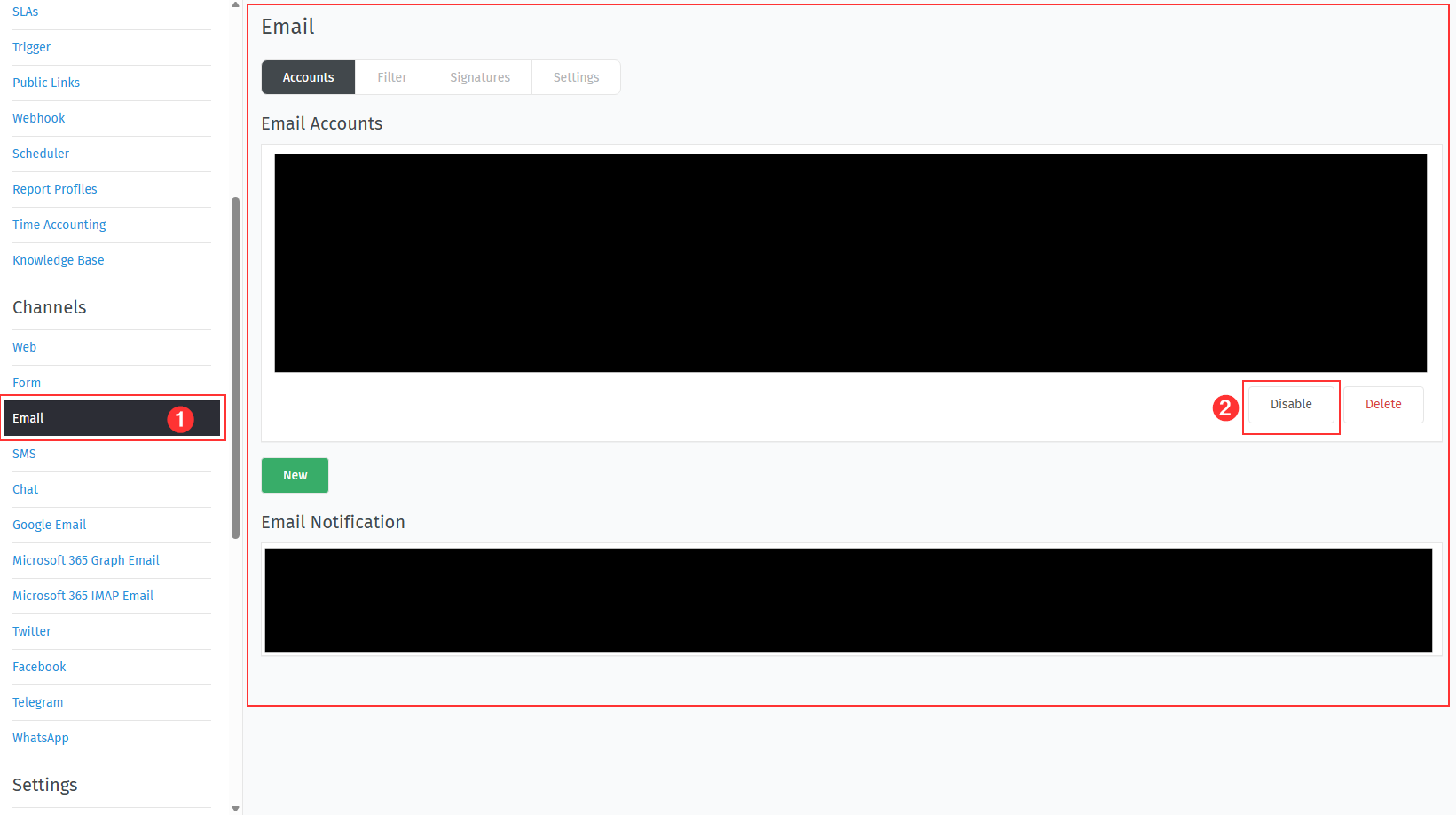
For anyone who needs a workaround for this scenario, I disabled the email account underSettings > Email > Email Accounts.
Also, make sure the user you don’t want to receive emails is not part of the Agent group.Settings > Users, where you can filter users by Agent and temporarily remove them from that group (you can add them back later).
After that, re-enable the email account.
This isn’t the proper or ideal solution, but it worked for resolving my situation.
DD4PK
February 11, 2026, 9:24am
3
Sorry I’m tired and not reading all of that, but I use a tag for that. Some people don’t want to get a notification for everything that happens so we just set this DISABLE_NOTIFICATIONS tag and filter that in our mail notification triggers.
1 Like
0xdolan
February 12, 2026, 10:50pm
4
Thank you. Is it a global setting for all users or can be specific to some users as well?
DD4PK
February 13, 2026, 7:46am
5
Solely depends on what tickets you assign the tag to. If you set a scheduler to assign the tag in a specific way to certain user’s tickets, then those will no get notifications at all.
1 Like
system
February 20, 2026, 7:47am
6
This topic was automatically closed 7 days after the last reply. New replies are no longer allowed.