Disable notifications about ticket closure

Hello,

I have successfully set up Zammad and have gotten quite familiar with it. It’s a really great tool!

However, one thing bothers me: When I close a ticket, the customer receives an email with the following content:

"Hello Max Mustermann,

the ticket (Test) has been updated by ‘Agent’.

Changes:
Status: new → closed

View in ZAMMAD"

How can I disable or customize this notification? And if I can’t disable it, why not? It’s particularly annoying that it says “View in ZAMMAD” at the bottom. This links to Zammad, and since we only use Zammad locally, it always links to the local IP. That doesn’t make sense. Our customers shouldn’t be able to access Zammad over the internet.

What’s the best way to solve this?

Thank you and best regards

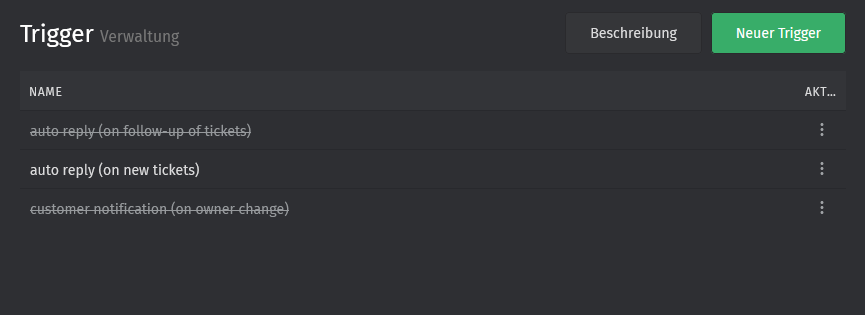
Go to Admin > Trigger. In this section you can modify the text or disable it completly.

And der your Hostname in the settings (i mean under System) to the right URL

This will not work, because there is no trigger for this. :slightly_frowning_face:

I know how to change the hostname, but as I said we use Zammad only in our local network.

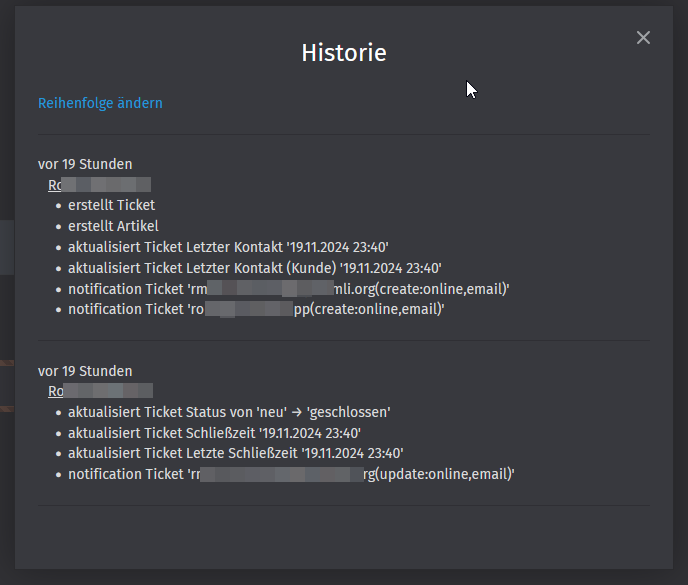
Go to the ticket and click on the right headline „Ticket“. Here should be a history. Now look which module sends the notification.

Maybe it is the default notification in your Profile. Go to your Profile and click on notifications.

In the Admin area you can set the default values for all users

1 Like

There is " * notification Ticket ‘rmail+zammad@systemli.org(update:online,email)’"

But I don’t know which module and where to change this notification

Okay, I disabled this notification in Settings > Ticket > Notifications > Default Notifications

But then its also disabled for agents. And its not possible to change the text in this notification. Its important when it will send to the customer. I don’t get it why its not possible. :frowning:

Btw. My Zammad is now very slow. I click on update ticket and it will need 4-6 seconds to proceed. Sometimes nothing is happen and I need to reload the website. But CPU and RAM usage is fine, CPU is under 10% and RAM also fine. hmmm… sad.

Edit: Maybe because I had multiple tabs with Zammad? Now its working fine again. Strange.

Edit 2: And again very slow and not working… And I just have one tab… why?

NHMEsWYVv5

If I’d had to guess you’ve exceeded the available database connections.
https://docs.zammad.org/en/latest/appendix/configure-database-server.html

1 Like

I followed all steps at the beginning, but you are right. So I guess I have not changed the config path and ignored the errors. Strange.

I changed the value now. Should work now. Thank you so much!

This topic was automatically closed 360 days after the last reply. New replies are no longer allowed.