Hello everyone
I haven’t managed to connect WhatsApp yet. I have set up the WhatsApp app in the Facebook manager and when I enter the API secret, token, etc. it shows me the right number. But when I enter the callback URL and the token in Facebook I get the following error message:
The callback URL or verify token couldn’t be validated. Please verify the provided information or try again later.
I don’t know if that helps. When I call up the callback URL in the browser I get the following message from Zammad:
422: The change you wanted was rejected.
The WhatsApp channel webhook configuration could not be verified.
E, [2024-06-21T14:01:17.613708#11781-149600] ERROR – : WhatsApp Webhook: GET https://DOMAIN/api/v1/channels_whatsapp_webhook/502c9833-fa27-4ed5-8ba5-92ba4e863370
E, [2024-06-21T14:01:17.613760#11781-149600] ERROR – : WhatsApp Webhook: Headers: #<ActionDispatch::Http::Headers:0x000075bf2e833228 @req=#<ActionDispatch::Request GET “https://DOMAIN/api/v1/channels_whatsapp_webhook/502c9833-fa27-4ed5-8ba5-92ba4e863370” for IP>>
E, [2024-06-21T14:01:17.613793#11781-149600] ERROR – : WhatsApp Webhook: Params: #<ActionController::Parameters {“controller”=>“channels_whatsapp”, “action”=>“verify_webhook”, “callback_url_uuid”=>“502c9833-fa27-4ed5-8ba5-92ba4e863370”} permitted: false>
E, [2024-06-21T14:01:17.613818#11781-149600] ERROR – : WhatsApp Webhook: Payload:
E, [2024-06-21T14:01:17.613940#11781-149600] ERROR – : The WhatsApp channel webhook configuration could not be verified. (Exceptions::UnprocessableEntity)
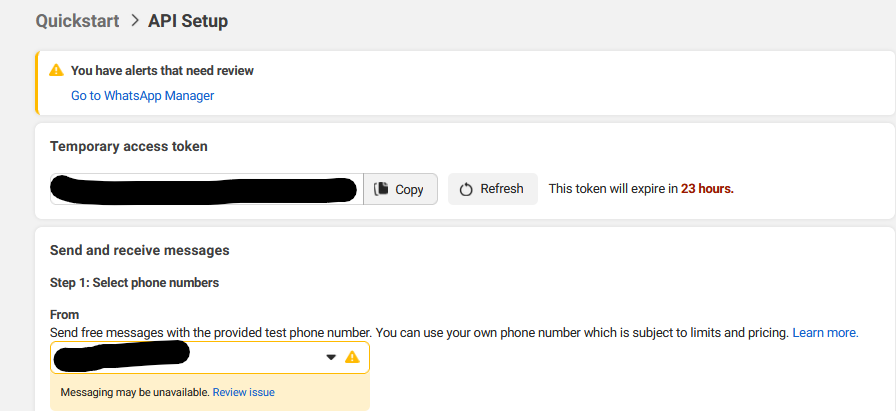
Yes, I followed the instructions from Zammad. However, I still have a message on Facebook that I can’t get rid of. When I click on the links in the message, the app opens and I don’t get an alert. Does that have something to do with it? I suspect there’s an error with my Zammad.
In my experience you’ll have to add payment information and ensure that the display name of the whatsapp number fits what’s on your companies registration. At least that was the issue a day after I successfully integrated it.
You should find this in the dashboard or by using “review issue” below the number. The interface is extremely confusing and has a bad overview.
Would be nice to have the real headers of the request, but there are not logged in a good way currently.
And the verify token is really the correct one? Maybe there is some whitespace present?
The question will be if it’s filtered in some way on your side or if Meta is sending it already wrong. You could test sending this verify request to another endpoint (you could create one here: https://pipedream.com/).