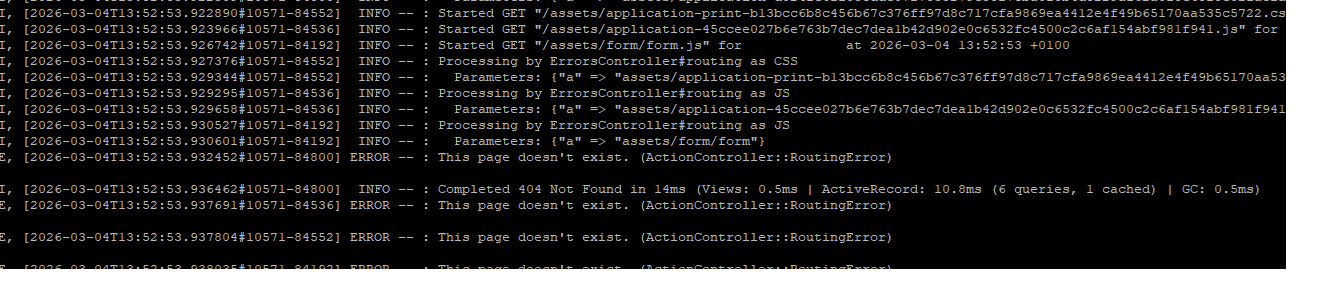
Run a clean reload (usually via CTRL + SHIFT + R).
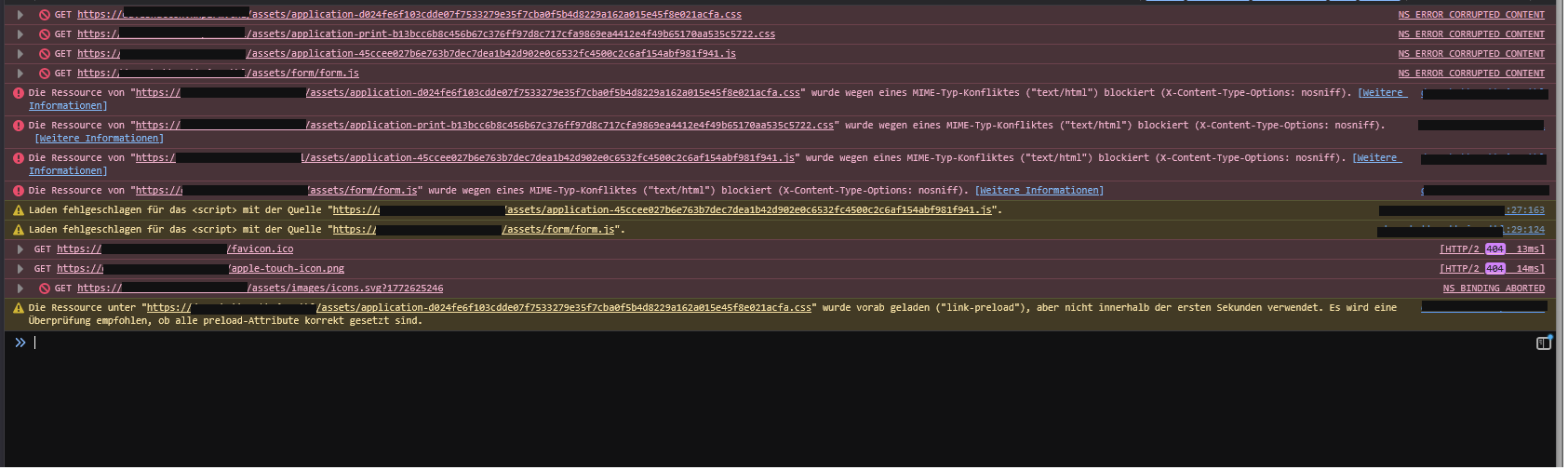
If that doesn’t help, check the developer console if the assets are failing.
If that is the case, execute /opt/zammad/contrib/packager.io/postinstall.sh manually and check if the script returns any error output.
Synchronizing state of redis-server.service with SysV service script with /usr/lib/systemd/systemd-sysv-install.
Executing: /usr/lib/systemd/systemd-sysv-install enable redis-server
Starting Redis server
Redis server is running.
(Re)creating init scripts
Nothing to do.
Nothing to do.
Nothing to do.
Enabling Zammad on boot
Stopping Zammad
Clear cache…
database.yml found. Updating db…
Updating translations…
No custom packages detected…
Configuring Elasticsearch…
Enforcing 0600 on database.yml …
Starting Zammad
Creating webserver bootstart
Synchronizing state of nginx.service with SysV service script with /usr/lib/systemd/systemd-sysv-install.
Executing: /usr/lib/systemd/systemd-sysv-install enable nginx
Restarting webserver nginx - please check if all required modules are enabled in case webserver fails to start.
Add your fully qualified domain name or public IP to servername directive of
nginx, if this installation is done on a remote server. You have to change:
/etc/nginx/sites-available/zammad.conf and restart nginx process.
Otherwise just open http://localhost/ in your browser to start using Zammad.
What does your developer console say…?
Do you connect to Zammads nginx directly (and have you applied the required changes?) or is there any further proxies in between?
Please try a different browser just to be sure. It’s odd that your nginx delivers text/html for css files. What happens / what do you see when you open that file directly in your browser?
rm -rf /opt/zammad/public/assets/*.js* /opt/zammad/public/assets/*.css*
to get rid of all precompiled asset files.
zammad run rake assets:precompile
to precompile the missing asset files we just nuked.
Followed by systemctl stop zammad && zammad run rails r "Rails.cache.clear" && systemctl start zammad
Then try again.
Precompiling will take a while which is normal. You can consider stopping Zammad before nuking already, it’s not like you can use it right now anyway.
zammad run rake assets:precompile
This project is configured to use pnpm because /opt/zammad/package.json has a “packageManager” field
I, [2026-03-04T14:33:41.468294#17595-2952] INFO – : Writing /opt/zammad/public/assets/application-print-b13bcc6b8c456b67c376ff97d8c717cfa9869ea4412e4f49b65170aa535c5722.css
I, [2026-03-04T14:33:41.468842#17595-2952] INFO – : Writing /opt/zammad/public/assets/application-print-b13bcc6b8c456b67c376ff97d8c717cfa9869ea4412e4f49b65170aa535c5722.css.gz
I, [2026-03-04T14:33:41.474687#17595-2952] INFO – : Writing /opt/zammad/public/assets/print-b13bcc6b8c456b67c376ff97d8c717cfa9869ea4412e4f49b65170aa535c5722.css
I, [2026-03-04T14:33:41.474816#17595-2952] INFO – : Writing /opt/zammad/public/assets/print-b13bcc6b8c456b67c376ff97d8c717cfa9869ea4412e4f49b65170aa535c5722.css.gz
I, [2026-03-04T14:33:41.488257#17595-2952] INFO – : Writing /opt/zammad/public/assets/knowledge_base-78f231b6da659306eee77e69d1b3bc58aa6441b813708a87c9aa9b308372d3db.css
I, [2026-03-04T14:33:41.488372#17595-2952] INFO – : Writing /opt/zammad/public/assets/knowledge_base-78f231b6da659306eee77e69d1b3bc58aa6441b813708a87c9aa9b308372d3db.css.gz
I, [2026-03-04T14:33:41.504001#17595-2952] INFO – : Writing /opt/zammad/public/assets/svg-dimensions-0d7a6f4de77ee707bbb5627e0fba1845b2c56f351342d9d3d8d839cf1be7ef98.css
I, [2026-03-04T14:33:41.508599#17595-2952] INFO – : Writing /opt/zammad/public/assets/svg-dimensions-0d7a6f4de77ee707bbb5627e0fba1845b2c56f351342d9d3d8d839cf1be7ef98.css.gz
I, [2026-03-04T14:33:41.512799#17595-2952] INFO – : Writing /opt/zammad/public/assets/font-fbb40422ff63c14ac4b864bc5d9595cbc1b2ab6e5b6e9e32f5e47dad0e3941a7.css
I, [2026-03-04T14:33:41.513023#17595-2952] INFO – : Writing /opt/zammad/public/assets/font-fbb40422ff63c14ac4b864bc5d9595cbc1b2ab6e5b6e9e32f5e47dad0e3941a7.css.gz
I, [2026-03-04T14:33:41.518044#17595-2952] INFO – : Writing /opt/zammad/public/assets/knowledge_base_public-0f8d1cfbba6852d5b6148fa360cbb9d47f9adaea18cb1ca6b970f136631880b8.js
I, [2026-03-04T14:33:41.518110#17595-2952] INFO – : Writing /opt/zammad/public/assets/knowledge_base_public-0f8d1cfbba6852d5b6148fa360cbb9d47f9adaea18cb1ca6b970f136631880b8.js.gz
I, [2026-03-04T14:33:41.526527#17595-2952] INFO – : Writing /opt/zammad/public/assets/knowledge_base_public_polyfills-fbc2070881eb4ea83f4f6fb77935d1e38c6dac5f02f6746114775e2cee57f3d5.js
I, [2026-03-04T14:33:41.526593#17595-2952] INFO – : Writing /opt/zammad/public/assets/knowledge_base_public_polyfills-fbc2070881eb4ea83f4f6fb77935d1e38c6dac5f02f6746114775e2cee57f3d5.js.gz
I, [2026-03-04T14:33:41.533441#17595-2952] INFO – : Writing /opt/zammad/public/assets/ie11CustomProperties.min-386fc8aa5460fe382c479de1c446b989744e2ce6f10f4d2a33c23aecb8ffc89e.js
I, [2026-03-04T14:33:41.533524#17595-2952] INFO – : Writing /opt/zammad/public/assets/ie11CustomProperties.min-386fc8aa5460fe382c479de1c446b989744e2ce6f10f4d2a33c23aecb8ffc89e.js.gz
I, [2026-03-04T14:33:41.539597#17595-2952] INFO – : Writing /opt/zammad/public/assets/actiontext-454f0b4d806c39e8160bfe71e106aadf8067dec300c036db834ce9c77431fd96.js
I, [2026-03-04T14:33:41.539661#17595-2952] INFO – : Writing /opt/zammad/public/assets/actiontext-454f0b4d806c39e8160bfe71e106aadf8067dec300c036db834ce9c77431fd96.js.gz
I, [2026-03-04T14:33:41.545369#17595-2952] INFO – : Writing /opt/zammad/public/assets/actiontext.esm-80ed9a607b9a3d09392a0019b0a043ef12c69287a1b86b38242142b344119542.js
I, [2026-03-04T14:33:41.545462#17595-2952] INFO – : Writing /opt/zammad/public/assets/actiontext.esm-80ed9a607b9a3d09392a0019b0a043ef12c69287a1b86b38242142b344119542.js.gz
I, [2026-03-04T14:33:41.595690#17595-2952] INFO – : Writing /opt/zammad/public/assets/trix-5c41f04fe2b7e248ee7b935ae5b0c67c976bcabf9efa8f24d5789860b5a34209.js
I, [2026-03-04T14:33:41.595778#17595-2952] INFO – : Writing /opt/zammad/public/assets/trix-5c41f04fe2b7e248ee7b935ae5b0c67c976bcabf9efa8f24d5789860b5a34209.js.gz
I, [2026-03-04T14:33:41.597273#17595-2952] INFO – : Writing /opt/zammad/public/assets/trix-cdd93c365dd138707a0a84b191fb2d6d817806b92eac2ea64da2e203443fca64.css
I, [2026-03-04T14:33:41.597322#17595-2952] INFO – : Writing /opt/zammad/public/assets/trix-cdd93c365dd138707a0a84b191fb2d6d817806b92eac2ea64da2e203443fca64.css.gz
I, [2026-03-04T14:33:41.599537#17595-2952] INFO – : Writing /opt/zammad/public/assets/activestorage-f60ea27c4db98be182eefefabab3688f2b202f8767668c585211770e8a14a482.js
I, [2026-03-04T14:33:41.599586#17595-2952] INFO – : Writing /opt/zammad/public/assets/activestorage-f60ea27c4db98be182eefefabab3688f2b202f8767668c585211770e8a14a482.js.gz
I, [2026-03-04T14:33:41.602182#17595-2952] INFO – : Writing /opt/zammad/public/assets/activestorage.esm-fee9c2f0b9bd9ab1926eaabac57531571d401353035e74033ecd8922f0551064.js
I, [2026-03-04T14:33:41.602269#17595-2952] INFO – : Writing /opt/zammad/public/assets/activestorage.esm-fee9c2f0b9bd9ab1926eaabac57531571d401353035e74033ecd8922f0551064.js.gz
I, [2026-03-04T14:33:41.603738#17595-2952] INFO – : Writing /opt/zammad/public/assets/actioncable-33f40c86f84352c960ccdcc34b96672f64155cdd99bf5e470aa4db2e4dc19a0a.js
I, [2026-03-04T14:33:41.603796#17595-2952] INFO – : Writing /opt/zammad/public/assets/actioncable-33f40c86f84352c960ccdcc34b96672f64155cdd99bf5e470aa4db2e4dc19a0a.js.gz
I, [2026-03-04T14:33:41.606654#17595-2952] INFO – : Writing /opt/zammad/public/assets/actioncable.esm-f98be1e96e87930a3557c4c55ab1d313327db0b8649719ef7b0f280263648e7b.js
I, [2026-03-04T14:33:41.606740#17595-2952] INFO – : Writing /opt/zammad/public/assets/actioncable.esm-f98be1e96e87930a3557c4c55ab1d313327db0b8649719ef7b0f280263648e7b.js.gz
I, [2026-03-04T14:33:41.790128#17595-2952] INFO – : Writing /opt/zammad/public/assets/application-45ccee027b6e763b7dec7dea1b42d902e0c6532fc4500c2c6af154abf981f941.js
I, [2026-03-04T14:33:41.790233#17595-2952] INFO – : Writing /opt/zammad/public/assets/application-45ccee027b6e763b7dec7dea1b42d902e0c6532fc4500c2c6af154abf981f941.js.gz
I, [2026-03-04T14:33:41.802159#17595-2952] INFO – : Writing /opt/zammad/public/assets/application-d024fe6f103cdde07f7533279e35f7cba0f5b4d8229a162a015e45f8e021acfa.css
I, [2026-03-04T14:33:41.802253#17595-2952] INFO – : Writing /opt/zammad/public/assets/application-d024fe6f103cdde07f7533279e35f7cba0f5b4d8229a162a015e45f8e021acfa.css.gz
Lockfile is up to date, resolution step is skipped
Packages: +1
+
Progress: resolved 1, reused 1, downloaded 0, added 1, done
Done in 827ms using pnpm v10.29.1
Nothing changed Zammad Screen is still not available
Unfortunately, the nginx config also contains other virtual hosts that I removed from the config before posting it. But I will check the zammad_ssl.conf file and compare it with the settings I have. At first sight, I don’t see any big differences between the versions.
I seem to include /etc/nginx/mime.types, which zammad_ssl doesn’t seem to do. But most sites seem to recommend adding that line.
Since you had the same error as I did, I’m curious to know which config change you had to make to your nginx config to make it work again.
Did you also have to run the commands to clear the assets/caches, or was your nginx.conf change sufficient to fix it?