Infos:
- Used Zammad version: 7.2.2-1791469052.5a641e1.ubuntu22
- Used Zammad installation type: package
- Operating system: Ubuntu 22.04.5 LTS
- Browser + version: Microsoft Edge 155.0.4283.45
Expected behavior:
- Models loaded from the server to configure
Actual behavior:
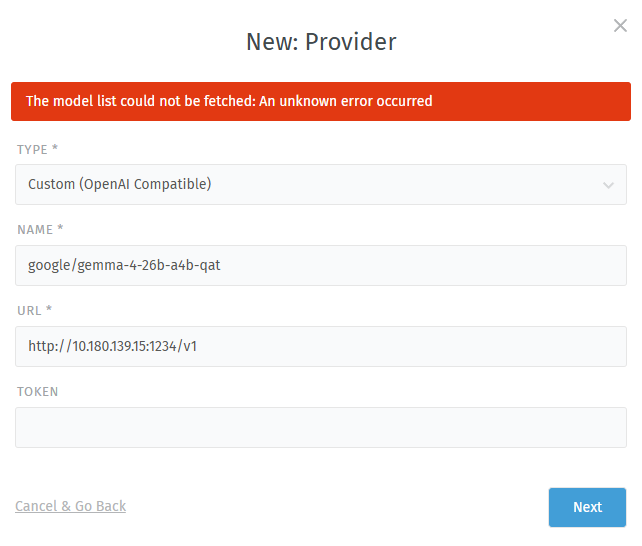
Steps to reproduce the behavior:
- Start llmster on a computer and make a couple models available
- Sign into Zammad and navigate to AI Providers in the interface
- Press New Provider Button
- Choose Custom
- Enter model name and llmster URL
- Press Next button
I have a couple of other Zammad instances on the same network, and they are able to connect to the computer running llmster and populate the models field.
Watching the production log didn’t turn up anything particularly interesting. Here is what it looks like filtered to “AI” and “Error” right after pressing the “Next” button in the web interface:
tail -f /var/log/zammad/production.log | grep -i -E "error|ai"

INFO -- : Started POST "/api/v1/ai/provider_connections/models" for 10.180.133.51 at 2026-10-09 01:52:52 +0000
INFO -- : Processing by AI::ProviderConnectionsController#models as JSON
INFO -- :   Parameters: {"provider" => "custom_open_ai", "config" => {"url" => "http://10.180.139.15:1234/v1", "token" => "[FILTERED]"}}
Here is what I get back when pointing a browser at the URL manually (http://10.180.139.15:1234/v1/models):
{
  "data": [
    {
      "id": "text-embedding-embeddinggemma-300m-qat",
      "object": "model",
      "owned_by": "organization_owner"
    },
    {
      "id": "google/gemma-4-26b-a4b-qat",
      "object": "model",
      "owned_by": "organization_owner"
    }
  ],
  "object": "list"
}