Used Zammad installation type: (source, package, docker-compose, …)
docker-based (running in k8s)
Operating system:
Ubuntu 25.10
Browser + version:
Google Chrome 143.0.7499.110
Expected behavior:
All my triggers are all the time executed, if their conditions are met. The order of a trigger that changes the group assignment of a ticker should not matter (at least as long following triggers do not use the ticket group as a condition).
Actual behavior:
When creating multiple triggers the order does matter (as documented), but in general multiple triggers are executed → that is good.
Anyways, I configured my triggers in the sense that I have one that sends a notification on ticket creation, another one (with slightly different conditions, but still on ticket creation) assigns some ticket values (e.g. we use a region for tickets that we set depending on the creator) and a third one changes the group assignment (on ticket creation) from “API auto assignment” to something like “Support Level 1 - Product XY”.
Now I wanted to simplify configuration a little by stopping repeating conditions. I wanted to have the e.g. the notification trigger to use the group as a condition and not the same/repeated conditions that I also used at the last/third trigger (the one that changes group). So… I logged in and renamed the group change trigger to a name which made it the first one in the execution order. Even before I changed conditions for the other triggers I tested if everything still works, but it does not (and this is now unexpected :)). No other triggers executed that are after the position of the group changing trigger. All the other conditions on all my triggers do not include a check for the group or similar (I double-checked that).
Steps to reproduce the behavior:
Create multiple triggers, where one changes the group of the ticket. Configure all triggers with similar conditions (e.g. only use the ticket name as a condition). Create a ticket that matches the condition → depending on the order of the trigger that changes group, either all triggers will execute (if the group changing trigger is the last one), or only the group change trigger will execute (if it is the first one) or something in the middle (e.g. if it is the second trigger in line the first two triggers will execute, but not more)
Hi, I had something similar happening with automatic ticket closing upon creation when certain conditions are met.
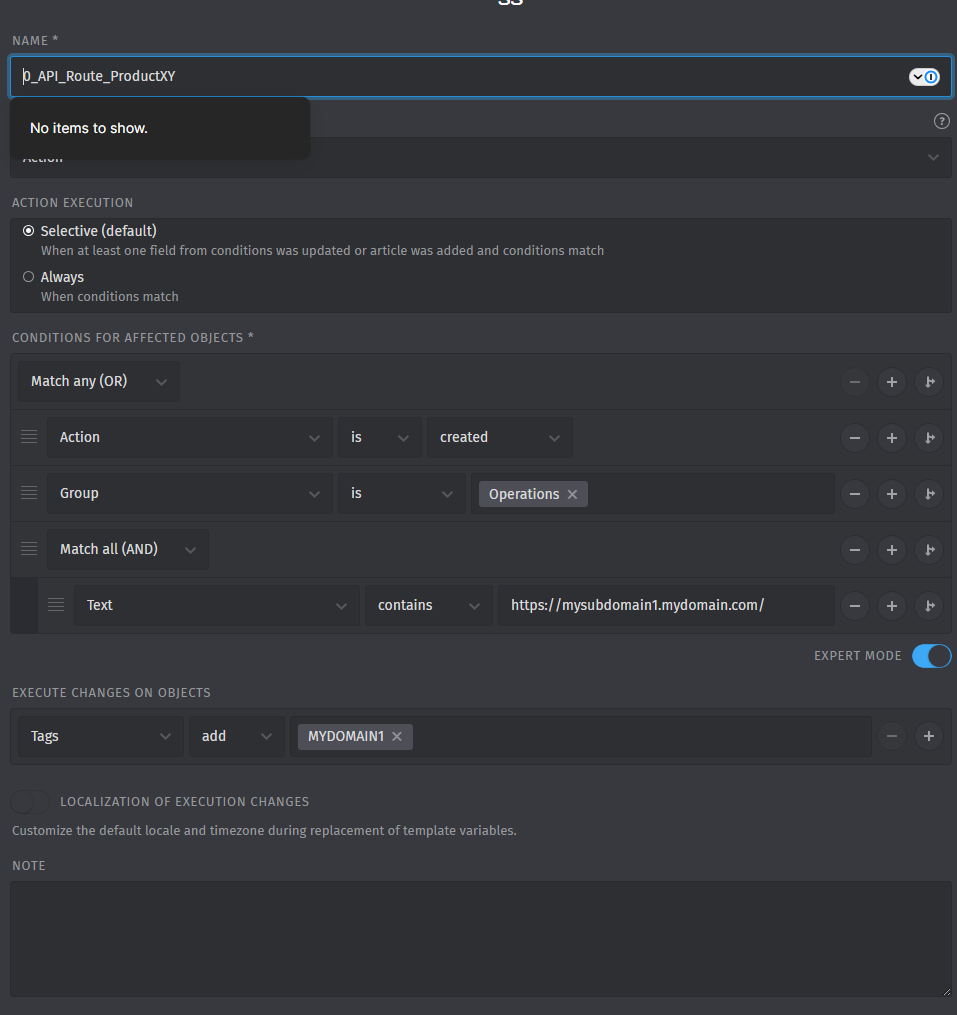
What finally worked reliably for me was explicitly naming triggers to enforce their execution order, for example:
0_Global_*
1_Group1_*
2_Group2_*
3_Group2_notifications*
Once I did this and ensured that group-changing triggers were not executed too early, automatic closing and other follow-up triggers started working correctly again.
Yes, I think that might work for me as well.
Only issue is that I need to repeat the conditions in all my triggers again and can not just write on the notification something like “Where group is Support Level 1 - Product XY” (instead I need to repeat all the checks from the group change trigger).
That is the reason why I would see the current behavior as “suboptimal” and hope that somebody takes a look
Expected would be this (I would like to configure it like this):
The “change group” trigger has this:
if ticket action is “created”
if reference link starts with any of https://mysubdomain1.mydomain.com/ or … or .. (followed by a potentially long list, but for testing also tried with one domain only…)
if group is “API auto assignment”
Then:
update group to “Support Level 1 - Product XY”
The “reference link” mentioned is a textfield that we added to the ticket object in the admin section (system-> objects).
The other two triggers should basically have this:
if ticket action is “created”
group is “Support Level 1 - Product XY”
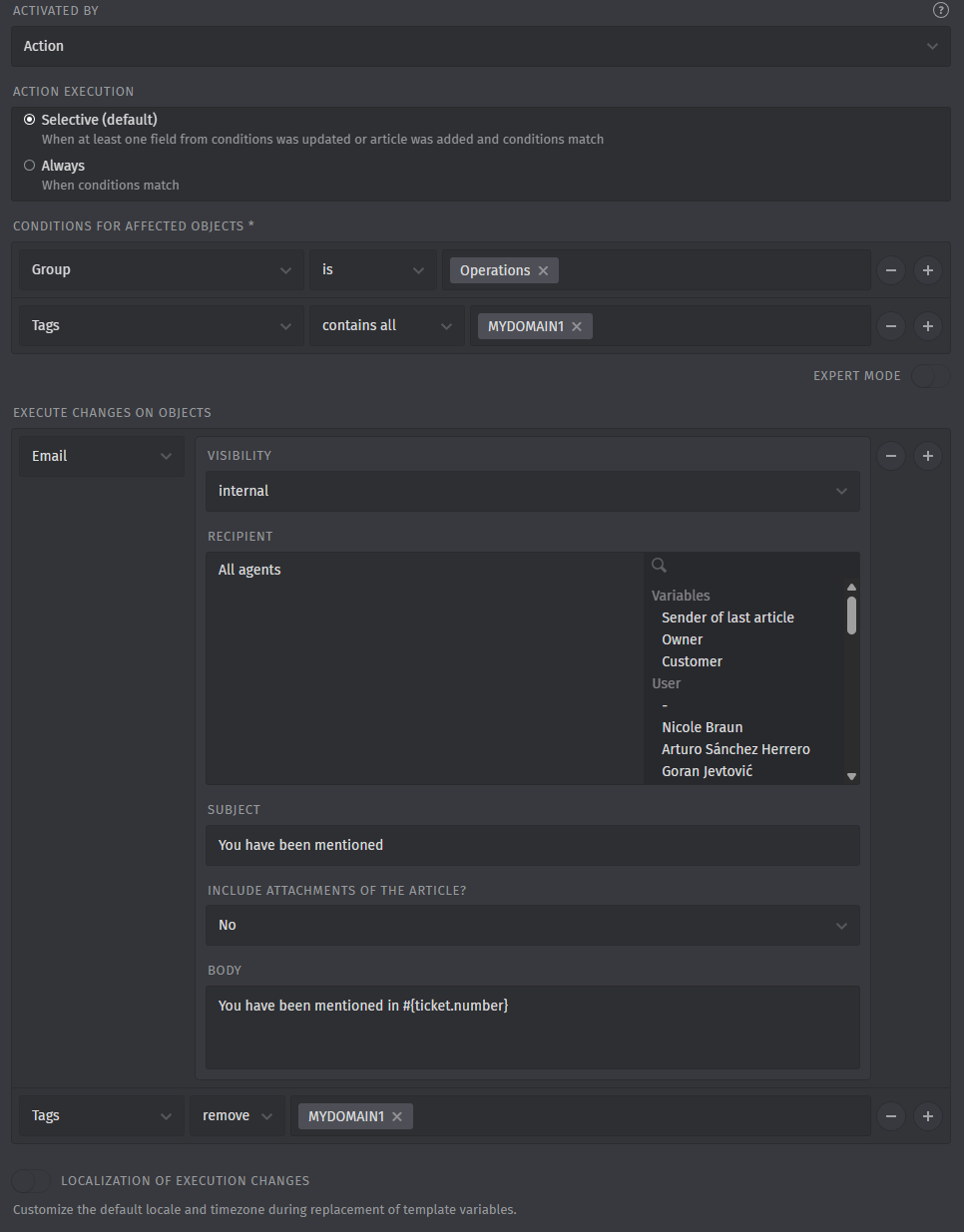
Then send a notification to some fixed mail addresses (trigger 2) or set an initial boolean flag called “commented_by_l1” to false (trigger 3 - that “commented_by_l1” field was also added using the objects config in the admin->system part as a boolean flag):
Actual:
But since I can not use the “group is Support Level 1 - Product XY” at the moment (since that update is last in the list) I need to repeat all the “reference_link starts with” subdomains in all the triggers…
So… it is not an “OR” in the conditions, but all the time an “AND”.
OK… so maybe I could use tags or something similar, got it (I will try).
But why is all this hassle needed?
Shouldn’t zammad just be able to re-assign the group and still make sure that all other triggers afterwards are still executed?
Honestly I’m not the person to answer the question behind the trigger logic.
All I know is that every time I had to create a trigger and i had to place a bunch of conditions i had trouble with that trigger, that is why i started using priority with Global, Deprtment logic ever since then i have no problems at all.
Test system would also be great to have to test logics behind it all.
Triggers always handle the current ticket attributes and the article (if applicable) that causes the trigger to fire. A related object context might not be available for performing changes.
This basically says it:
If you change the ticket group to the group another trigger is looking for during a trigger run, then this change is technically ignored because it’s in another “change set”.
So the trigger shouldnt run. I’m not sure if this has always been that way or if that’s somewhat part of a loop protection. After all those years stuff gets a little bit blurry.
if that would be fully true, then the order of a trigger would not matter at all, would it?
In that case the solution suggested by @Gogsy (using a tag) would not work, but it does…
No, the order of triggers is relevant. As I said, I just quoted the documentation, the alphabetical order is mentioned there as well. maybe it was adjusted and forgotten in the documentation.
Many times i had to analyze why the triggers are not working it became a nuclear project, while I agree that in theory trigger order should not matter, in practice it clearly does on my system.
Adjusting the trigger order resolved the issue consistently.
Yes, I got something working on the test system that seems to work (instead of using a tag I used a new tree_select field, but taking that aside followed your suggestion). I can tell you by a 100% if it works, once I have it on the production sytem and some real load on it (not just test tickets :))
We would need some explicit example triggers that are not working as expected. Then we can maybe check if it’s expected or not.
Normally, the order should not be that important when a trigger is changing attributes that are irrelevant to the conditions.
But for sure, trigger execution is a complex topic; there is also the possibility to activate the recursive execution when needed, but it’s disabled by default.
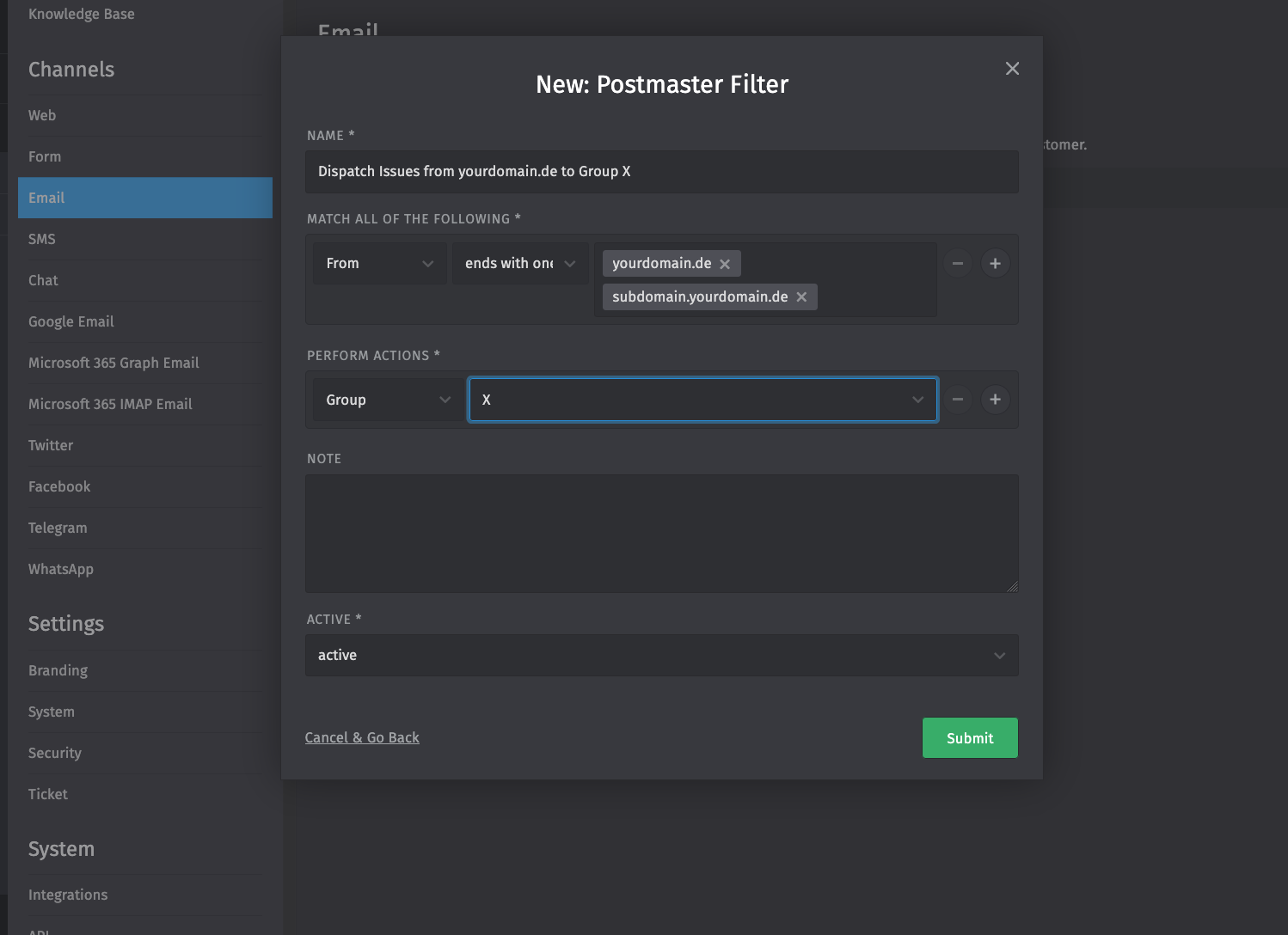
that you basically you want to route your ticket on a reliable criteria (domain) to a certain group.
First off with the newest release 7.0 (there’s no official release date yet), there will be KI Agents at your disposal. These will allow you to use prompts and as a KI Agent type a Group Dispatcher act exactly as your current trigger do.
Then let’s take a step back to your current situation in 6.5.0. I prefer simple solutions, and you could use E-Mail filters (Manage > Channels > Email > Filter) instead. They will reduce the load on your system and remove the hassle of figuring out the async execution order. It will achieve the same result.

 I hope I have understood you right… i have made an example and see if this is sommething you could use