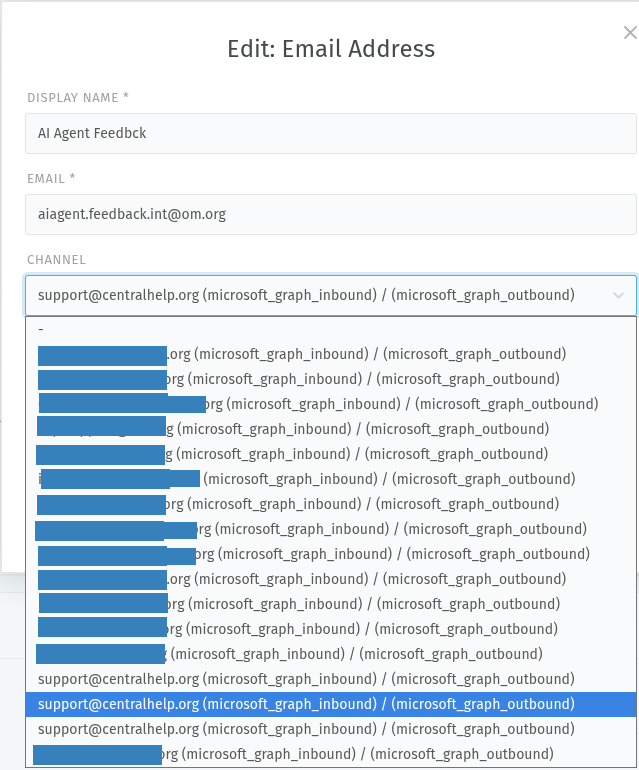
We are using the new Microsoft 365 Graph Email channel for monitoring multiple mailboxes.
The majority are user mailboxes, but we have started experimenting with using shared mailboxes.
Our primary support user (support@centralhelp.org) is granted full access permissions on the shared mailboxes.
When you edit an outgoing email address for a channel with a shared mailbox, then you should be able to select said shared mailbox from the drop-down as you would for the channels using the user mailbox.
Actual behavior:
The shared mailbox channels are not listed, but we see an extra copy of the primary channel (support@centralhelp.org) for each shared mailbox that we add.
This might be by design and I missed something in the documentation… But it seems odd to me. I want to use the shared mailbox channel for outgoing, but I do not know which one to pick.
Steps to reproduce the behavior:
Create 1 M365 Graph Email channel with user mailbox X
Create 1 M365 Graph Email channel with shared mailbox Y. Grant permission to connect using user mailbox X on shared mailbox Y.
Attempt to edit an outbound email address for the shared mailbox. All channels in the Channels drop-down are named after mailbox X
If you choose the second option “Do not change email address”, this dropdown shouldn’t be an issue.
I believe this bug might become a deal breaker in case you add aliases to your mail boxes. Be careful there.
If my little research i just did has lead be to the right conclusion, this appears to be a front-end UI bug only.
app/assets/javascripts/app/models/channel.coffee
Has this code:
displayName: ->
    name = ''

    if @options
      if @options.inbound?.options?.user
        if @options.inbound.options.host
          name += "#{@options.inbound.options.user}@#{@options.inbound.options.host} "
        else
          name += "#{@options.inbound.options.user} "
      if @options.inbound?.adapter
        name += "(#{@options.inbound.adapter})"

    (outbound stuff here)

    if name == ''
      name = '-'
    name
and it lacks another check for a shared mailbox like this:
if @options.inbound?.options?.shared_mailbox
    name += "#{@options.inbound.options.shared_mailbox} "
Thanks for that. I am aware that we are behind in our version. We are working on an upgrade to Zammad 7, but have some infrastructure challenges that have kept us from moving off of Alma Linux 8, until now. Maybe this is even fixed in version 7+…
I do not know if it makes any major impact for the users. I just wonder if it will use the wrong account to send the email. I have some users testing for me this week to assess the impact.