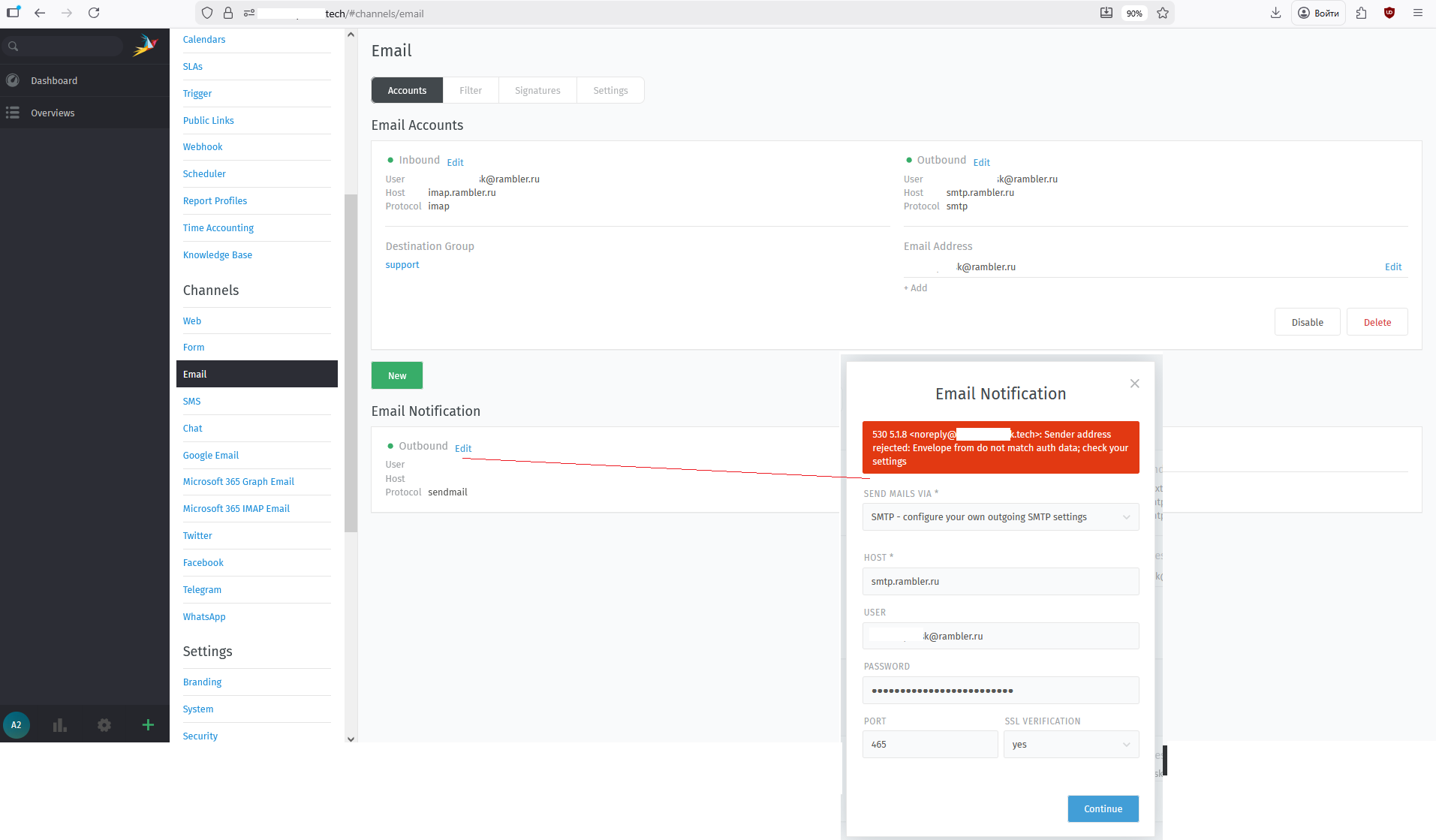
In the Email Notification settings, I am receiving the following error: 530 5.1.8 <noreply@*******k.tech>: Sender address rejected: Envelope from do not match auth data; check your settings
How can I bypass this “brilliant” (not really) logic?
No clue. What did you configure?
The message is a direct response from your mail system.
I attached a picture, it’s waiting for approval.
Ah yes.noreply@<Zammad FQDN>. You’ll need ton adjust it first.in the documentation
Adjust the sender address in the email channels setting first, then configure the notification channel and you’ll be good.
I’ve set up the connection as shown in the image.
Your Zammad tries to send as noreply@, while the account is a different one and may not use noreply@.
How can I avoid using noreply@? What does it mean? How can I do that?
Please read my previous answer and follow the link to the documentation. You will find it at the bottom of the page.
I’ve already configured the sender address. It’s marked in green (Inbound/Outbound) in the image above.
Thanks for the help. It wasn’t very obvious, but I think I got it set up.
1 Like
system
February 12, 2026, 8:18am
12
This topic was automatically closed 7 days after the last reply. New replies are no longer allowed.