scheduler stop processing email

Infos:

  • Used Zammad version: 6.5.3
  • Used Zammad installation type: (source, package, docker-compose, …): Helmchart
  • Operating system: N/A
  • Browser + version: Chrone + 101

Expected behavior:

  • new email get processed from the google inbox

Actual behavior:

  • After a some time ( around 5h ) it stops processing email, and if i look in the monitoring tab on the GUI there are errors about the scheduler not running any tasks, like cleanup / mail fetch /etc
    restarting the pod fixes, there are no error in the logs

Steps to reproduce the behavior:

  • wait 5is hour and the pod just stall,

Are there any performance tunings in place?
Could also be relevant to this issue:

There have been issues with “silently” dying schedulers in the past which are hard to narrow down.

I have increased the thread to the DB to 60

the monitoring say


{
  "healthy": false,
  "message": "scheduler may not run (last execution of CacheClearJob.perform_now 2 days ago) - please contact your system administrator;Channel: Google::Account in  is active but not fetched for about 18 hours",
  "issues": [
    "scheduler may not run (last execution of CacheClearJob.perform_now 2 days ago) - please contact your system administrator",
    "Channel: Google::Account in  is active but not fetched for about 18 hours"
  ],
  "actions": [],

There is nothing in the logs for the scheduler, it looks like its processing lile normal, if i run a fetch from the rails console it will fetch the mail, any suggestions on debugging this?

Hi @ab52 ,

thanks for reaching out to us.

First off, we don’t officially support Docker or Kubernetes, yet. Therefore any ideas presented here are - at best - personal experience.

That said, have you tried to install Zammad using only the package manager on a Linux based server? That would narrow down the problem to either Docker/Kubernetes or Zammad itself.

You can make a fully copy using: Backup and Restore — Zammad System Documentation documentation and restore it on the Linux based server.

Best regards
De Long

Hi Zammad community,

For about a month now I’ve been noticing very frequent freezes of the scheduler. My monitoring system reports issues almost every few days, for example:

scheduler may not run
(last execution of OnlineNotification.cleanup about 2 hours ago)
- please contact your system administrator

scheduler may not run
(last execution of Ticket.process_pending 31 minutes ago)
- please contact your system administrator

scheduler may not run
(last execution of ImportJob.start_registered about 2 hours ago)
- please contact your system administrator

scheduler may not run
(last execution of Ticket.process_auto_unassign about 4 hours ago)
- please contact your system administrator

scheduler may not run
(last execution of ExternalCredential::Exchange.refresh_token 24 minutes ago)
- please contact your system administrator

Has anyone experienced similar issues lately or found a reliable fix? Any help would be greatly appreciated.

a { text-decoration: none; color: #464feb; } tr th, tr td { border: 1px solid #e6e6e6; } tr th { background-color: #f5f5f5; }

Additionally, the only workaround I currently use is manually restarting the scheduler service, as I don’t see any other solution at the moment. The server itself is not under load, the PostgreSQL database looks healthy, and the logs are completely clean.

I’m waiting for the next major Zammad release — hopefully it will fix these issues (or introduce new ones ;P).

@MBekspert what environment are you running on?

Linux 6.1.0-41-amd64 #1 SMP PREEMPT_DYNAMIC Debian 6.1.158-1 (2025-11-09) x86_64 GNU/Linux 32 GB RAM 8 vcPU
Zammad from package 6.5.2-17659039
change config
zammad config:set ZAMMAD_MAX_THREADS=8
zammad config:set ZAMMAD_WORKER_THREADS=12
zammad config:set WEB_CONCURRENCY=8

/etc/redis/redis.conf:
maxmemory 1gb
maxmemory-policy allkeys-lru

$ zammad run rails r “p Sessions.list.uniq.count”
58

Hey @MBekspert ,

thanks for the additional infos.

Did you by any chance update anything related to Zammad a month before? Linux? Zammad itself?

The 7.0 is not officially confirmed with a date, and it’s coming. It’ll probably do both - as humans are involved :stuck_out_tongue:

Best regards
De Long

Hey @Dr4gon ,
I conducted an extensive verification of the situation regarding Zammad, and it appears that the issues actually started in June 2025. According to the change log, the problems correlate precisely with the update to Zammad version 6.5. Specifically, on 2025‑06‑13 the system was updated from version 6.4.1 to 6.5.

Start-Date: 2025-06-12 19:32:19
Upgrade: zammad:amd64 (6.4.1-1740041753.d1854e51.bookworm, 6.5.0-1749747762.06d0d09c.bookworm), elasticsearch:amd64 (7.17.27, 7.17.28)

Start-Date: 2025-06-16 21:13:39
Commandline: apt upgrade
Upgrade: zammad:amd64 (6.5.0-1749747762.06d0d09c.bookworm, 6.5.0-1750081170.05c943c2.bookworm)

Start-Date: 2025-06-30 18:31:32
Upgrade: zammad:amd64 (6.5.0-1750081170.05c943c2.bookworm, 6.5.0-1751286427.c7b49f45.bookworm)

Start-Date: 2025-07-17 16:39:16
Upgrade: zammad:amd64 (6.5.0-1751286427.c7b49f45.bookworm, 6.5.0-1752675208.6878f0d2.bookworm)

Start-Date: 2025-08-27 07:08:54
Commandline: apt-get upgrade
Upgrade: zammad:amd64 (6.5.0-1752675208.6878f0d2.bookworm, 6.5.1-1755869083.a659a77f.bookworm)

Start-Date: 2025-08-27 07:08:54
Commandline: apt-get upgrade
Upgrade: zammad:amd64 (6.5.0-1752675208.6878f0d2.bookworm, 6.5.1-1755869083.a659a77f.bookworm)

Start-Date: 2025-09-14 07:51:31
Upgrade: zammad:amd64 (6.5.1-1755869083.a659a77f.bookworm, 6.5.1-1757685677.3b34f3d9.bookworm)

Start-Date: 2025-09-28 15:57:24
Upgrade: zammad:amd64 (6.5.1-1757685677.3b34f3d9.bookworm, 6.5.2-1758956852.cb9e869e.bookworm)

Start-Date: 2025-12-17 17:41:42
Upgrade: zammad:amd64 (6.5.2-1758956852.cb9e869e.bookworm, 6.5.2-1765903927.5697ef96.bookworm), telegraf:amd64 (1.36.2-1, 1.37.0-1)

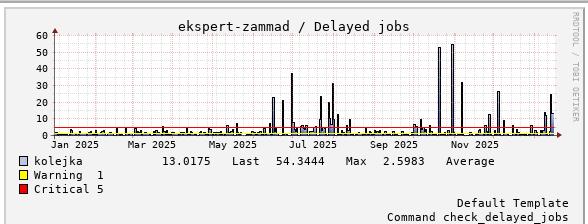
I also reviewed the monitoring data more broadly, and after an internal discussion of the current situation, we confirmed that the changes I introduced in November and the recent adjustments have no impact on the scheduler errors.

Hey @MBekspert

thank you for sharing the thorough investigation.

Is there any way you can reproduce the problem with a step by step example on a clean installation/environment and open up an issue?

Happy weekend,
De Long

Hey, I have a Zammad test environment but I can’t reproduce this problem there.

Back in my days schedulers silently died under load. Most often on heavy loaded systems. Alongside with very special edge cases… that made debugging this topic so extremely difficult. Most likely still is.

I put a hack in place that restarts the scheduler every 6 hours and since then its been fine.

I was unable to try in other platform yet…

Hi, this is an idea. Ugly, but effective :wink:
Regards, Michał

seems to only happen when i make lots of chancing to settings/database settings, which when setting things up will be a lot, but once it all setup it seems like things settle down

Hi, I’d like to add some information to this thread. After updating Zammad to version 7, when the problems occurred, I was able to notice more details.

/opt/zammad/vendor/bundle/ruby/3.4.0/gems/activerecord-8.0.5/lib/active_record/connection_adapters/abstract/connection_pool/queue.rb:127:in 'block in ActiveRecord::ConnectionAdapters::ConnectionPool::Queue#wait_poll': could not obtain a connection from the pool within 5.000 seconds (waited 5.058 seconds); all pooled connections were in use (ActiveRecord::ConnectionTimeoutError)
        from <internal:kernel>:168:in 'Kernel#loop'
        from...

I didn’t change the pool. I changed the Zammad parameters.
My current parameters:
Linux 6.1.0-44-amd64 #1 SMP PREEMPT_DYNAMIC Debian 6.1.164-1 (2026-03-09) x86_64 GNU/Linux
32 GB RAM
8 vcPU

Zammad from package 7.0.1-17756320q

change config, acive config
WEB_CONCURRENCY 5
ZAMMAD_MAX_THREADS 5
ZAMMAD_WORKER_THREADS 5
ZAMMAD_SESSION_JOBS_CONCURRENT 1
ZAMMAD_PROCESS_SESSIONS_JOBS_WORKERS 1
ZAMMAD_PROCESS_DELAYED_JOBS_WORKERS 2

/etc/redis/redis.conf:
maxmemory 4gb
maxmemory-policy allkeys-lru

After changing the parameters since April 1st, the scheduler hasn’t reported any problems.
Thanks for your help. This thread can be closed.
Have a great day, Michał

The pooling error usually indicates that Zammad tries to use more connections than Postgres allows. max_connections should be set to 2000 to be on the safe site.

Assuming a pool size of 50 (default), Zammad takes 200 connections without tuning.
@MBekspert configuration takes 450 by the math.

I had and still have 2k connections set. According to monitoring, it’s not a problem with Postgres connections.

These current settings are good or optimal, I don’t know, but it’s stable and that’s the most important thing for me.

1 Like