I’m evaluating Zammad as our possible new ticket system + knowledge base, so I’m having a trial account now.
I created a Customer Organization, and 2 Users belonging to that Organization. These users have the role Customer. In Organization, Shared Organization is set to yes (intended).
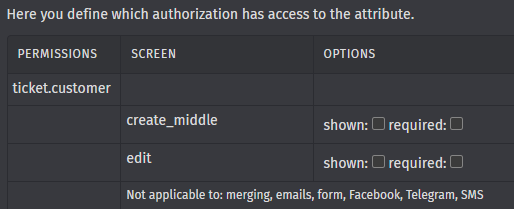
I defined a few Ticket.Objects, and for some of them I set the Permissions for ticket.customer as none (so didn’t tick the create_middle and edit, not for shown, neither for required), so these fields shouldn’t be visible for these Users, never.
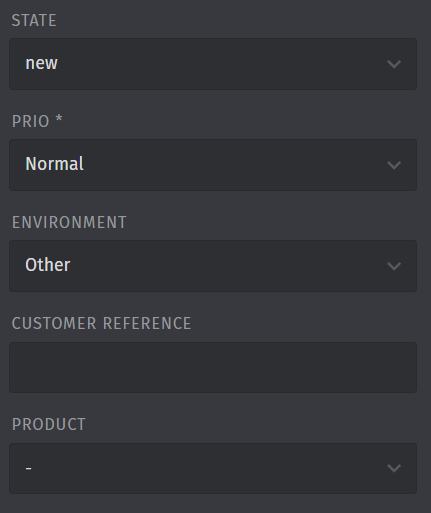
When User1 creates a ticket, these fields are not visible. Perfect!
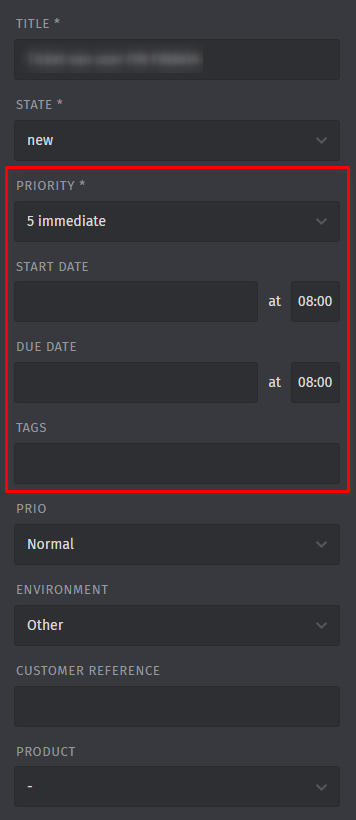
However, when User2 accesses this ticket, these fields are visible and editable! This is not ok!
Just to be sure it isn’t a fault on the User1 and User2, I tried it the other way around as well, so create a ticket by User2 and check what User1 can see. Identical behaviour.
Infos:
Used Zammad version: 7.0.0 (trial account)
Used Zammad installation type: trial account, so hosted
Operating system: Windows
Browser + version: Edge, Chrome, both latest versions
Expected behavior:
Customer User that has not created the ticket, should also not be able to see fields that are not are not permitted
2 Users with identical Roles in the same Organization. Some new Ticket.Objects that are only visible and editable for Agents. User1 creates a ticket, User2 opens the same ticket.
I’m pretty sure I didn’t mix up things. First time I noticed it, I was indeed confused and not sure if I saw it correctly. I have my Agent in Vivaldi browser, User 1 in private browser Edge and User 2 in private browser Chrome. Ticket raised by User1 gives the Agent fields for User2, ticket raised by User2 gives the Agent fields for User1. The user that has raised the ticket only has the customer fields.
The issue you refer to seems indeed the same. Apologies I didn’t recognize that one as the same as my issue.
That ticket is marked as completed, but when can I expect that to reach my instance? I signed up for the free trial, so that would be the SaaS instance I guess?
For me this is a showstopper to start using Zammad in real life, so I would really like to see it functioning as expected for this topic.
Contact SaaS and request them to pull the instance. Reference the issue so they know what‘s this about. Instances are pulled in waves so updates take their time.
Yes, as already mentioned, you should contact the support. The instances are updated from time to time automatically, but for sure, sometimes there can be some delay until you get some changes.