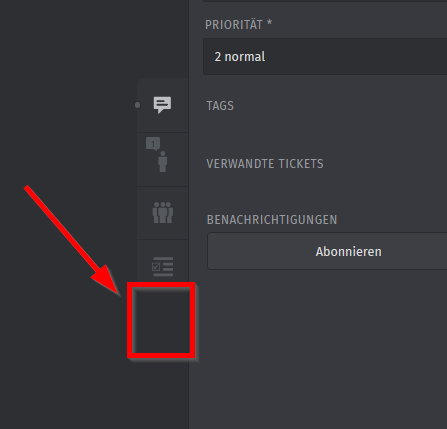
Title: Templates should also be made available (tab known when creating a new ticket), in an existing, open ticket.
Currently templates are only availble once a new ticket is being created in the system. This seems to be odd, as templates can be useful when corresponing with clients via E-Mail.
We have tickets in which we need to work on configuration in various external systems. The e-mail answer to our clients are in these instances quite long, as we need to confirm and explain what has been done and what needs to be done by the client for each item in the request. It’s like a guideline. As a workaround we use text modules, but we prefer to use text modules for short phrases or sentences.
What is your expectation/what do you want to achieve? We would like to have the tab which is visible when creating a new ticket also to be visible within an exiting ticket. In this screenshot it should be added to the four above tabs: (ticket, client, organisation and checklist) This feature should be configurable. On/off; per group or owner.
thanks for your suggestions and your links. We already use text modules, as an alternative.
It just doesn’t seem to be consistent, that templates can only be used for new ticket creation. What was the reason you don’t support it whithin existing tickets?
many thanks & best regards
The main reason we don’t support templates for responding to existing tickets is that we already have several features that cover that use case, whereas we didn’t have a solution for pre-filling ticket creation forms.
thanks for your response.
I guess it’s not a question of what we can’t do with text modules (as already mentioned we are using them) although your documentation and your pre-filled samples give the impression that these are used for short sentences rather for long texts as e-mail answers.
It is more from a user perspective and the usability of the tool that it would be more consistent to have those templates available in both places, when it comes to existing tickets and having the need to add longer and more complex e-mail answers, including tables, for client communication. Also from an admin perspective, e.g. for clearer handling: where to add/edit/delete templates (long & complex) vs. text modules (short & crisp).
Thanks!
Ticket templates don‘t just add text, but also prefill other fields like title and attributes. So in existing tickets, thus approach wouldn‘t make sense.
Your text module can be as long as detailed as you need them. At some points, a KB entry might make more sense though.
The documentation just gives short impressions. It wouldn‘t make any difference if it‘d show a huge page of information. Someone would need to be creative and it wouldn‘t add any additional value, it just takes up screen space.
just because it doesn’t make sense to you, it may for others. Also, it is not a must to prefill all fields/some fileds with a template, right?
In any case, I noticed that you are all set with your feature text modules / templates.
Thank you for listening anyhow.
FWIW, I agree with you. I would definitely find it useful if I could insert a template that I created into an existing ticket. The use case I’m thinking of is when we get a phone call and I’ve created a new ticket for it after getting the basics of what the call is about. If the follow-up involves sending the customer an email with the solution and I have a template that has all the info with variables but not a corresponding text-module, I’d like to be able to insert the text of the template and then edit as needed. Another situation is if a customer is emailing about something and you discover that there’s something else going on for which you have a template with variables but no corresponding text module. Same deal; why duplicate effort and create a new ticket if you don’t think that a new ticket needs to be created, especially if what you discovered is part of the reason why they emailed but is technically a separate thing.
But ticket templates do not resolve variables at all. I mean I get what you are saying, but I believe other functions are a better fit. My personal opinion of course.
Text modules can always be edited after loading them into the editor.