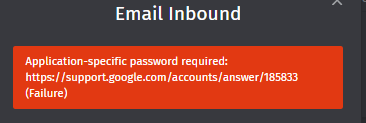
I am encountering an authentication error even though the parent email ID entered is correct. I’ve also tried using an alternate parent email ID, but the issue persists.
Could you please advise on the steps I should take to resolve this?
I am encountering an authentication error even though the parent email ID entered is correct. I’ve also tried using an alternate parent email ID, but the issue persists.
Could you please advise on the steps I should take to resolve this?
I was forced to correct the posts category.
Please, use the correct category and provided templates during the thread creation if you want help.
Considering the error message, it seems to me you’re using Google Workspace? I’m guessing you’ll have to check your Google Account’s security settings?
Have you enabled 2FA and created an application specific password for Zammad?
Per the link in error message:
An app password is a 16-digit passcode that gives a less secure app or device permission to access your Google Account. App passwords can only be used with accounts that have [2-Step Verification](https://support.google.com/accounts/answer/185839) turned on.

## When to use app passwords

**Tip:** iPhones and iPads with iOS 11 or up don't require app passwords. Instead use "Sign in with Google."

If the app doesn't offer "Sign in with Google," you can either:

* Use app passwords
* Switch to a more secure app or device

## Create & use app passwords

**Important:** To create an app password, you need 2-Step Verification on your Google Account.

If you use 2-Step-Verification and get a "password incorrect" error when you sign in, you can try to use an app password.

[Create and manage your app passwords](https://myaccount.google.com/apppasswords). You may need to sign in to your Google Account.

If you've set up 2-Step Verification but can't find the option to add an app password, it might be because:

* Your Google Account has 2-Step Verification [set up only for security keys](https://support.google.com/accounts/answer/6103523).
* You're logged into a work, school, or another organization account.
* Your Google Account has [Advanced Protection](https://support.google.com/accounts/answer/7539956).

**Tip:** Usually, you'll need to enter an app password once per app or device.
Also:
App passwords revoked after password change

To help protect your account, we revoke your app passwords when you change your Google Account password. To continue to use an app with your Google Account, [create a new app password](https://support.google.com/accounts/answer/185833#app-passwords).

**Tip**: If the app offers "Sign in with Google," we recommend you use that feature to connect the app to your Google Account.
The usage of application passwords is outdated and not recommended.
Use the google channel instead.