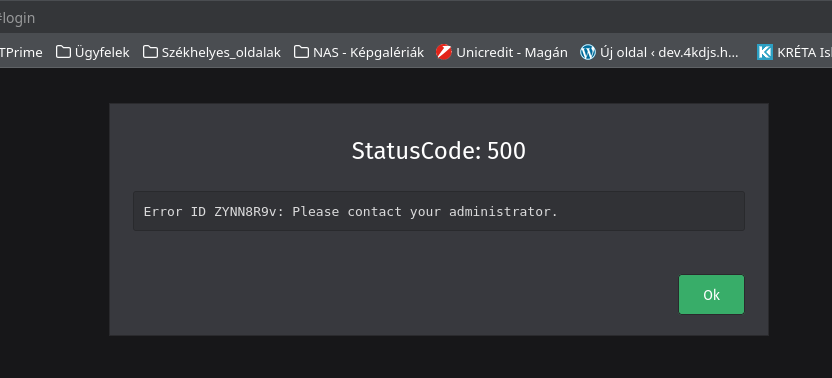
Browser + version: Firefox 137 and Opera 119.0.5497.40
Expected behavior:
access Zammad web interface
Actual behavior:
not access any Zammad web services (login page expected)
Steps to reproduce the behavior:
Start Zammad services without error.
service postgresql start
service redis start
service zammad start
sservice zammad-web start
service zammad-websocket start
service zammad-worker start
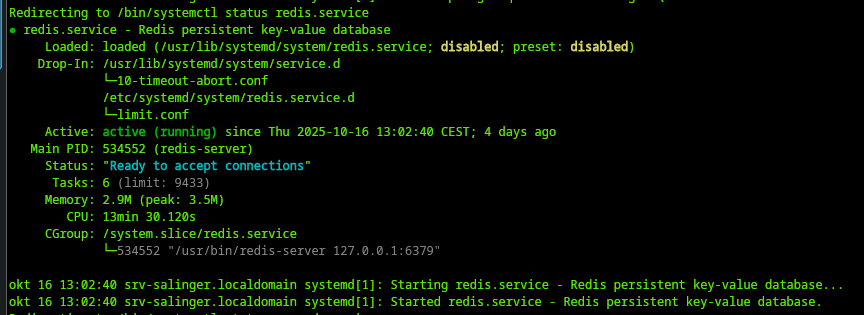
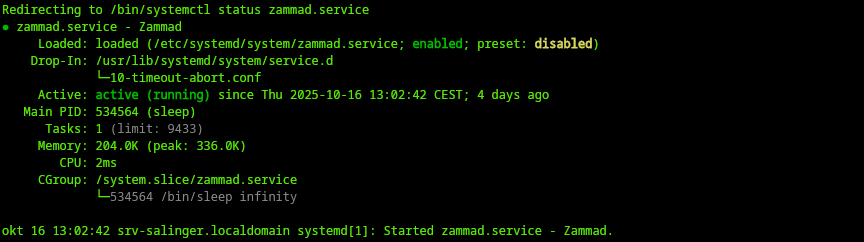
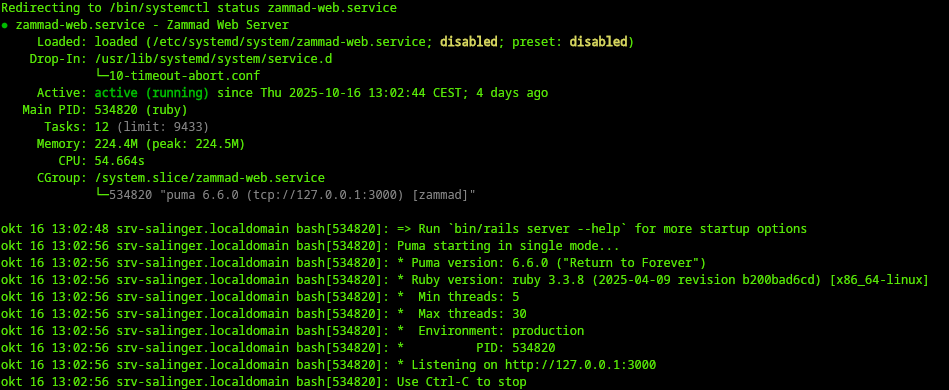
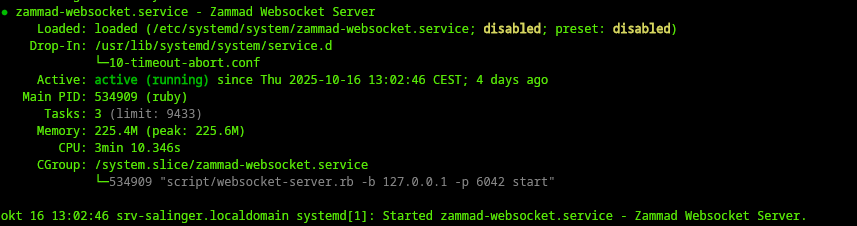
How can I convinced that Zammad really running and no error with it ?
The traceback is incomplete so hard to tell what exactly is wrong.
You should see the Ports 3000 and 6042 in use. I’d say this is not the case, I’d even bet that the services are not running correctly.
You may want to use a package or docker based installation. The source code installation is by far the hardest installation method.
Here is the apache2 proxy configuration for Zammad.
# ZAMMAD APACHE2 VIRTUAL HOST CONFIGURATION
#
# this is an example apache 2.4 config for zammad
# Please visit https://docs.zammad.org for further input on how to configure
# your apache to work with Zammad
#

# security - prevent information disclosure about server version
#ServerTokens Prod

<VirtualHost *:80>
#    modsecurity on
#    modsecurity_rules_file /usr/local/apache2/conf/modsecurity.d/modsec_rules.conf
    ServerAdmin itadmin@itprime.hu
    DocumentRoot "/mnt/xvdb1/_www/helpdesk.itprime.hu"
    ServerName helpdesk.itprime.hu
    ServerAlias helpdesk.itprime.hu
        ProxyPass / http://10.42.1.247/
        ProxyPassReverse / http://10.42.1.247/

    Redirect / https://helpdesk.itprime.hu/
    SSLEngine off
#    RewriteEngine On
#    RewriteOptions Inherit
    ErrorLog "logs/helpdesk.itprime.hu-error_log"
    CustomLog "logs/helpdesk.itprime.hu-access_log" combined
</VirtualHost>

<VirtualHost *:443>
#    modsecurity on
#    modsecurity_rules_file /usr/local/apache2/conf/modsecurity.d/modsec_rules.conf
    ServerAdmin itadmin@itprime.hu
    DocumentRoot "/mnt/xvdb1/_www/helpdesk.itprime.hu"
    ServerName helpdesk.itprime.hu
    ServerAlias helpdesk.itprime.hu
    HostnameLookups Off
    UseCanonicalName Off
    ServerSignature Off
    Header always set Strict-Transport-Security "max-age=63072000"
        ProxyPreserveHost on
        ProxyRequests Off
            <Proxy *>
                Order deny,allow
                Allow from all
            </Proxy>
    SSLProxyEngine on
# legacy web socket server
        ProxyPass /ws ws://10.42.1.247:6042/ "retry=1 acque=3000 timeout=600 keepalive=On"
#        ProxyPass / https://10.42.1.247/
#       ProxyPassReverse / https://10.42.1.247/
# action cable
        ProxyPass /cable ws://10.42.1.247:3000/cable "retry=1 acque=3000 timeout=600 keepalive=On"
        ProxyPass / http://10.42.1.247:3000 "retry=1 acque=3000 timeout=600 keepalive=On"
    <Location />
        Order Deny,Allow
        Deny from all
        Allow from all
        RequestHeader set X-Forwarded-Proto "https"
        RequestHeader set X-Forwarded-Port "443"
    </Location>
    SSLEngine On
    RewriteEngine On
    RewriteOptions Inherit
    SSLProtocol             all -SSLv3 -TLSv1 -TLSv1.1
    SSLCipherSuite          ECDHE-ECDSA-AES128-GCM-SHA256:ECDHE-RSA-AES128-GCM-SHA256:ECDHE-ECDSA-AES256-GCM-SHA384:ECDHE-RSA-AES256-GCM-SHA384:ECDHE-ECDSA-CHACHA20-POLY1305:ECDHE-RSA-CHACHA20-POLY1305:DHE-RSA-AES128-GCM-SHA256:DHE-RSA-AES256-GCM-SHA384:DHE-RSA-CHACHA20-POLY1305
    SSLHonorCipherOrder     off
    SSLSessionTickets       off
#       SSLCACertificateFile /usr/local/apache2/conf/certs/cbca.cer
#    SSLCertificateChainFile /usr/local/apache2/conf/certs/apache.crt
    SSLCertificateFile /usr/local/apache2/conf/certs/helpdesk.itprime.hu.crt
    SSLCertificateKeyFile /usr/local/apache2/conf/certs/helpdesk.itprime.hu.key
    ErrorLog "logs/helpdesk.itprime.hu-error_log"
    CustomLog "logs/helpdesk.itprime.hu-access_log" combined
</VirtualHost>
Why is your apache trying to use a external IP instead of localhost like the upstream version does? Zammad is listening on localhost only (v4). That‘s why your configuration is not working.
The proxy server is different vm thats why proxy send request to 10.42.1.247 which is the Zammad server (vm). If I set ZAMMAD_BIND_IP to 0.0.0.0 in /etc/zammad/zammad.env will Zammad run on any interface not only localhost ?
I have a similar setup, proxy on a vm and zammad on another vm. I have set ZAMMAD_BIND_IP to its internal lan ip. The proxy config (nginx in my case) then is set to
upstream zammad-railsserver {
  server 172.16.0.13:3000;
}

upstream zammad-websocket {
  server 172.16.0.13:6042;
}
zammad config:set ZAMMAD_BIND_IP=127.0.0.1 Replace with your IP. Ensure that the application server is only available to your proxy and not other users. This is potentially a security issue, if you don’t.
But Zammad generally works…? If so, a new Thread might be a good idea. Even uf bot, provide the whole traceback. This is not enough to understand what‘s happening at all.
BlockquoteI, [2025-11-04T12:50:54.650336#242265-195880] INFO – : Rendered layout layouts/application.html.erb (Duration: 3.2ms | GC: 0.0ms)
I, [2025-11-04T12:50:54.652913#242265-195880] INFO – : Completed 200 OK in 43ms (Views: 4.4ms | ActiveRecord: 15.3ms (6 queries, 1 cached) | GC: 0.5ms)
I, [2025-11-04T12:50:55.374202#242265-196380] INFO – : Started POST “/api/v1/signshow” for 10.42.1.249 at 2025-11-04 12:50:55 +0100
I, [2025-11-04T12:50:55.381008#242265-196380] INFO – : Processing by SessionsController#show as JSON
I, [2025-11-04T12:50:55.381083#242265-196380] INFO – : Parameters: {“fingerprint”=>“723682789”}
E, [2025-11-04T12:50:55.469476#242265-196380] ERROR – : undefined method []' for nil (NoMethodError) app/controllers/sessions_controller.rb:320:in config_frontend’
app/controllers/sessions_controller.rb:19:in rescue in show' app/controllers/sessions_controller.rb:12:in show’
app/controllers/application_controller/handles_transitions.rb:16:in handle_transaction' E, [2025-11-04T12:50:55.471349#242265-196380] ERROR -- : Error ID ZYNN8R9v: undefined method ’ for nil
I, [2025-11-04T12:50:55.471827#242265-196380] INFO – : Completed 500 Internal Server Error in 91ms (Views: 0.3ms | ActiveRecord: 4.2ms (117 queries, 111 cached) | GC: 0.0ms)
I, [2025-11-04T12:51:03.266857#242446-195960] INFO – : ProcessScheduledJobs running…
I, [2025-11-04T12:51:03.269765#242446-195960] INFO – : Running job thread for ‘Check channels.’ (Channel.fetch) status is: sleep
I, [2025-11-04T12:51:03.269880#242446-195960] INFO – : Running job thread for ‘Check ‘Channel’ streams.’ (Channel.stream) status is: sleep
I, [2025-11-04T12:51:03.269940#242446-195960] INFO – : Running job thread for ‘Generate ‘Session’ data.’ (Sessions.jobs) status is: sleep
I, [2025-11-04T12:51:13.279287#242446-195960] INFO – : ProcessScheduledJobs running…
I, [2025-11-04T12:51:13.282274#242446-195960] INFO – : Running job thread for ‘Check channels.’ (Channel.fetch) status is: sleep
I, [2025-11-04T12:51:13.282408#242446-195960] INFO – : Running job thread for ‘Check ‘Channel’ streams.’ (Channel.stream) status is: sleep
I, [2025-11-04T12:51:13.282471#242446-195960] INFO – : Running job thread for ‘Generate ‘Session’ data.’ (Sessions.jobs) status is: sleep
I, [2025-11-04T12:51:22.296875#242446-196220] INFO – : execute Channel.fetch (try_count 0)…
I, [2025-11-04T12:51:22.299031#242446-196220] INFO – : fetching imap (mail.itprime.hu/support@itprime.hu port=993,ssl=true,starttls=false,folder=INBOX,keep_on_server=true,auth_type=LOGIN,ssl_verify=true)
E, [2025-11-04T12:51:22.300217#242446-196220] ERROR – : Can’t use Channel::Driver::Imap: #<ActiveRecord::StatementInvalid:"PG::UndefinedTable: ERROR: relation "ssl_certificates" does not exist\nLINE 10: WHERE a.attrelid = ‘"ssl_certificates"’::regclass\n
Your installation might be ‚fresh‘ but definitely not successful at all. Ig you followed all steps, you would have ignored mayor error messages.
Please consider a package ibstallation on a fresh system. The source installation is on of the hardest and will most likely keep bugging you in a negative way.
Problem solved, Zammad works again. Data is also preserved. The solution was that when I had to run rake or rails commands with the “zammad” user, I didn’t switch to the zammad user correctly.
The wrong way: su - zammad
The right way: su zammad
After the correct switch, Zammad started after running the installation instructions (rake and rails commands).
Thank you all for your help,