-
What is your original issue/pain point you want to solve?
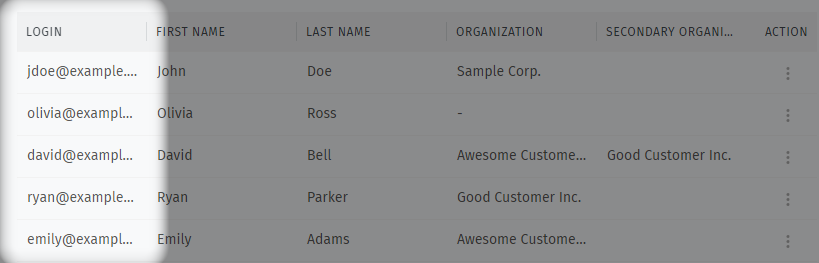
Quickly and easily copy entire column list of the users’ email addresses of all active users in a particular organization when on pagehttps://zammad.com/#manage/users. Ideal would be for the zammad page to provide a copy to clipboard function and automatically insert commas between fields and/or export to ‘*.csv’ so that we can quickly copy user email logins in bulk list in order to be able to paste into a different application. (The end use case is to workaround the inability of Zammad webgui that cannot batch create tickets and send emails to more than one customer, see for example https://community.zammad.org/t/new-ticket-send-email-allow-selecting-an-organizations-all-active-users/ ) -
Which are one or two concrete situations where this problem hurts the most?
When manually copying all rows of the column email “LOGIN” on this pagehttps://zammad.com/#manage/userswith mouse cursor or keyboard with shift and arrows the other columns are also become selected and highlighted ie “FIRST NAME”, “LAST NAME”, etc which is problem because requires manually editing the unnecessary other columns to remove everything else except email, and inserting comma to separate emails. -
Why is it not solvable with the Zammad standard?
I cannot find on this page or different page quick and easy bulk customer user email copy or export. -
What is your expectation/what do you want to achieve?
Feature request to provide additional function to copy or export ahttps://zammad.com/#manage/users“Users Management” column. For example, provide an additional menu when right click over a column to expand additional options to “copy this entire column data fields, comma separated”. Another example, provide a button at top right next to “Import” and “New User”, offer a new button “Export” that provides exporting to*.csvformat all users or the search results of users displayed or selected on the “Users Management” page.