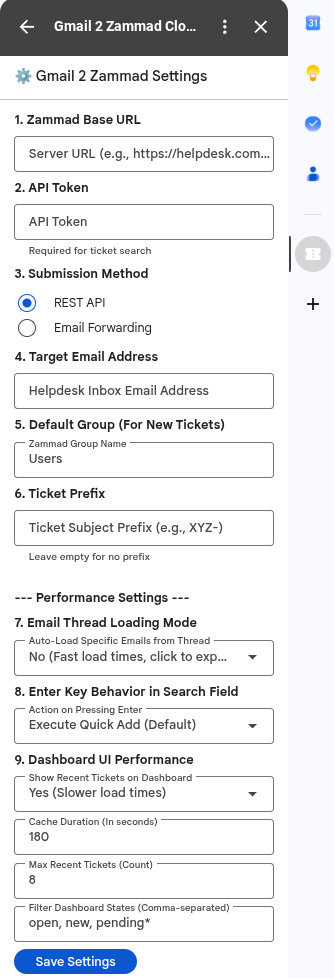
Multiple times a week, I found myself needing to import emails from Gmail into Zammad. Copy&Paste works… if you only care about the raw text. Forwarding works too, but you always have to add the ticket ID to the subject line and change the recipient.
So, I well… “vibecoded” a Gmail extension to fix this.
It works via the Zammad API or mail forwarding, and can import entire threads or just single mails. You can also search for tickets directly or add mails/threads straight to an existing ticket number. Plus, it accidentally works as an add-on in the Gmail iOS app too (didn’t even plan for that).
Right now, it’s only running as an internal test deployment in my Google Workspace domain.
I have absolutelty no idea how to deploy this thing in a regular way.
But I am willing to share the code if there is enough interest.
Why not just use the Google channel that looks within a subfolder that’s just for moving mails to Zammad? Or redirecting the mail to the mailbox… sounds much more complicated than it has to be.
Importing or forwarding is for new tickets.
An import keeps the original sender as the ticket customer. With a forward, that gets lost.
I wanted a solution for adding mails to existing tickets.
Imagine you have a ticket about a hardware defect. You contact the manufacturer’s support via your own inbox or their service portal. Email communcation ist created but the entire communication happens outside of Zammad. But usually, you want the team to see what happened and how decisions were made.
Without my plugin, I can only copy and paste the mails into the ticket, or forward them individually or let them picked up in a subfolder, which creates new tickets that I then have to merge with the support ticket. Downside: extra tickets (and altered emails due to the forward).
Or, for every single mail in Gmail, I have to click forward, edit the subject line to add the ticket ID, add the servicedesk email, and hit send so it attaches directly to the ticket. Downside: way too many manual inputs.
With my solution, I can (for example) attach all individual emails in bulk to the support ticket, while keeping the original emails completely intact.