# Upgrade 3.5 to 3.6 : zammad.postinst : freezed on chown -R zammad.zammad /opt/zammad?
**URL:** https://community.zammad.org/t/upgrade-3-5-to-3-6-zammad-postinst-freezed-on-chown-r-zammad-zammad-opt-zammad/5870
**Category:** Technical assistance
**Created:** [December 14, 2020, 1:58pm UTC](https://community.zammad.org/t/upgrade-3-5-to-3-6-zammad-postinst-freezed-on-chown-r-zammad-zammad-opt-zammad/5870 "2020-12-14T13:58:11Z")
**Posts on this page:** 7
**Page:** 1
### Author:  [@Meloman-zz](https://community.zammad.org/u/Meloman-zz)
#### Post date: [December 14, 2020, 1:58pm UTC](https://community.zammad.org/t/upgrade-3-5-to-3-6-zammad-postinst-freezed-on-chown-r-zammad-zammad-opt-zammad/5870/1 "2020-12-14T13:58:11Z")
Hi,
I upgraded from 3.5 to 3.6 on Ubnutu with a `sudo apt upgrade` and the bash console is still on “Setting up zammad (3.6.0-1607430494.246be029e.bionic)” for more than 3 hours now.
htop contains this since mors than 2 hours : `chown -R zammad.zammad /opt/zammad` with an activity under 1% of CPU !! 🤨
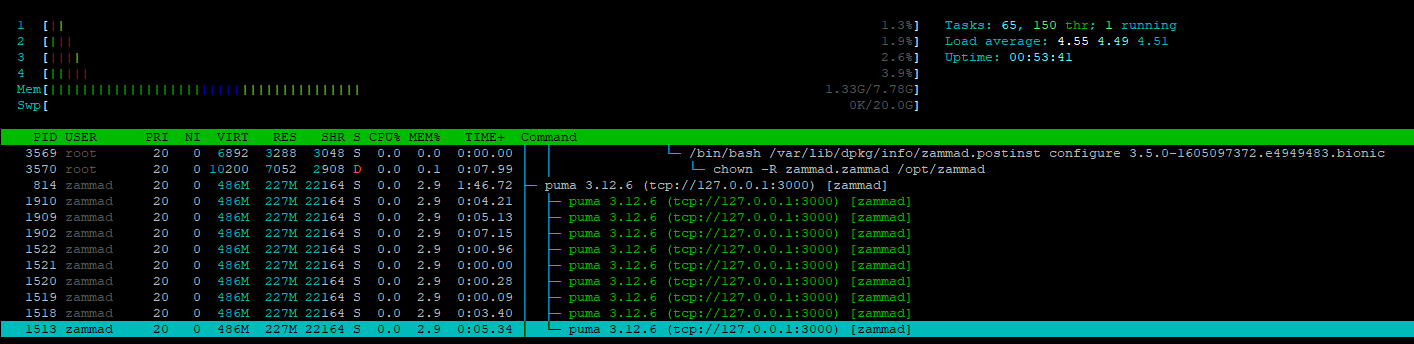
The **D** flag, I don’t like it ! 🤔
Can you help me?
---
### Author:  [@Meloman-zz](https://community.zammad.org/u/Meloman-zz)
#### Post date: [December 14, 2020, 2:19pm UTC](https://community.zammad.org/t/upgrade-3-5-to-3-6-zammad-postinst-freezed-on-chown-r-zammad-zammad-opt-zammad/5870/2 "2020-12-14T14:19:38Z")
I decided to stop postinst script and commented the line #54 in zammad.postinst :
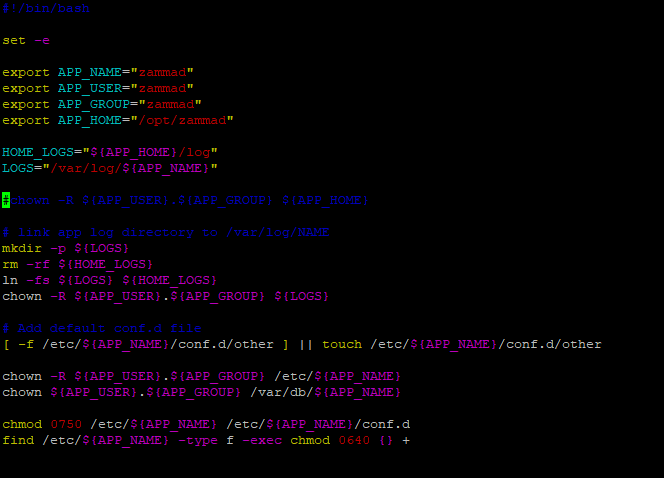
I run sudo `dpkg --configure -a` to restart post install script…
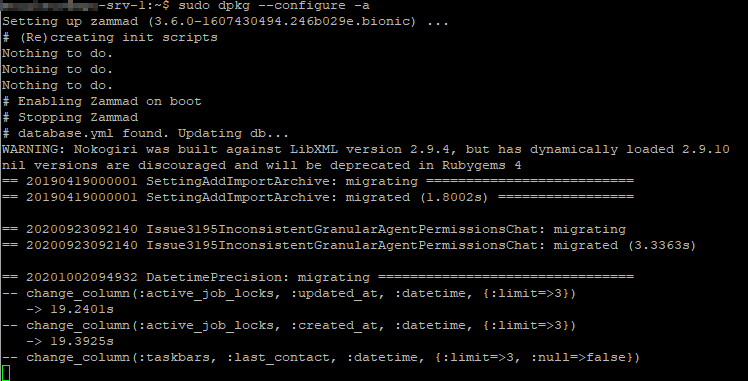
So script seems to work…
But myabe I will have bad surprise ??
---
### Author:  [@olafbuitelaar](https://community.zammad.org/u/olafbuitelaar)
#### Post date: [December 14, 2020, 2:50pm UTC](https://community.zammad.org/t/upgrade-3-5-to-3-6-zammad-postinst-freezed-on-chown-r-zammad-zammad-opt-zammad/5870/3 "2020-12-14T14:50:04Z")
chown’s on directories with many files can take a long time. The D flags indicates it’s waiting for IO/DiskAccess.
I suppose you could try running the chown post upgrade. Maybe if you have many files in the /opt/zammad/tmp directory, it should be safe to clear them before running the chown, which might speed up the process
---
### Author:  [@Meloman-zz](https://community.zammad.org/u/Meloman-zz)
#### Post date: [December 14, 2020, 3:18pm UTC](https://community.zammad.org/t/upgrade-3-5-to-3-6-zammad-postinst-freezed-on-chown-r-zammad-zammad-opt-zammad/5870/4 "2020-12-14T15:18:59Z")
Ok and how to clear it safely ?
Is it ok with :
`rails cache clear`
?
---
### Author:  [@olafbuitelaar](https://community.zammad.org/u/olafbuitelaar)
#### Post date: [December 14, 2020, 3:21pm UTC](https://community.zammad.org/t/upgrade-3-5-to-3-6-zammad-postinst-freezed-on-chown-r-zammad-zammad-opt-zammad/5870/5 "2020-12-14T15:21:46Z")
i’m not a zammad expert, but if would clear it, it would stop all services, and execute; rm -rf /opt/zammad/tmp/\*
But you could indeed also try with the rake commands
---
### Author:  [@MrGeneration](https://community.zammad.org/u/MrGeneration)
#### Post date: [December 30, 2020, 9:39am UTC](https://community.zammad.org/t/upgrade-3-5-to-3-6-zammad-postinst-freezed-on-chown-r-zammad-zammad-opt-zammad/5870/6 "2020-12-30T09:39:40Z")
Running `rails r "Cache.clear"` is a totally safe operation.
Heads up on removing `tmp/` directory as it _can_ contain the following to folders:
- `unprocessible_mail`
- `oversized_mail`
If you have those directories and they’re not empty, you may loose data which you might want to prevent. If not, removing shouldn’t be a too big deal.
On big installations the cown command usually takes long because administrators chose to store attachments within the filesystem and not database. While this makes absolutely sense, this slows down the update process with fairly many files.
* * *
The chown command is enforced by our packager and can’t be adjusted. Otherwise one could find a much less I/O requiring method to only touch affected files.
---
### Author:  [@system](https://community.zammad.org/u/system)
#### Post date: [April 29, 2021, 9:39am UTC](https://community.zammad.org/t/upgrade-3-5-to-3-6-zammad-postinst-freezed-on-chown-r-zammad-zammad-opt-zammad/5870/7 "2021-04-29T09:39:44Z")
This topic was automatically closed 120 days after the last reply. New replies are no longer allowed.