# PDconsumeInput: error while importing from zendesk
**URL:** https://community.zammad.org/t/pdconsumeinput-error-while-importing-from-zendesk/19195
**Category:** Technical assistance
**Created:** [December 3, 2025, 11:36am UTC](https://community.zammad.org/t/pdconsumeinput-error-while-importing-from-zendesk/19195 "2025-12-03T11:36:40Z")
**Posts on this page:** 6
**Page:** 1
### Author:  [@alberto.defaveri](https://community.zammad.org/u/alberto.defaveri)
#### Post date: [December 3, 2025, 11:36am UTC](https://community.zammad.org/t/pdconsumeinput-error-while-importing-from-zendesk/19195/1 "2025-12-03T11:36:40Z")
### Infos:
- Used Zammad version: 6.5.1-1758529346.a4e079f4.noble
- Used Zammad installation type: package (systemd service `zammad.service`)
- Operating system: Ubuntu 24.04.3 LTS
- Browser + version: Chrome (latest)
- VM Details: 4vCPU - 16GB RAM - 200GB DISK
### Expected behavior:
- Zendesk import should start and complete successfully, without backend/database errors.
### Actual behavior:
- When starting the Zendesk import from the web interface, Zammad shows:
`PQconsumeInput() FATAL: terminating connection due to administrator command – server closed the connection unexpectedly. This probably means the server terminated abnormally before or while processing the request.`
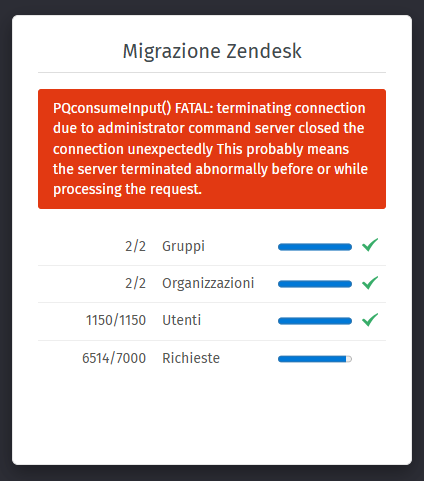
### Steps to reproduce the behavior:
- Fresh Ubuntu 24.04.3 system → Zammad installation → Import from Zendesk
---
### Author:  [@MrGeneration](https://community.zammad.org/u/MrGeneration)
#### Post date: [December 3, 2025, 11:37am UTC](https://community.zammad.org/t/pdconsumeinput-error-while-importing-from-zendesk/19195/2 "2025-12-03T11:37:42Z")
Please configure your postgres accordingly, like the documentation states here:
> **[Configure Database Server — Zammad System Documentation documentation](https://docs.zammad.org/en/latest/appendix/configure-database-server.html)**
You do not have enough connections (you need a minimum of 200 by default without tuning).
Then reset the installation and start over.
---
### Author:  [@alberto.defaveri](https://community.zammad.org/u/alberto.defaveri)
#### Post date: [December 4, 2025, 4:22pm UTC](https://community.zammad.org/t/pdconsumeinput-error-while-importing-from-zendesk/19195/3 "2025-12-04T16:22:44Z")
> [@MrGeneration](#):
>
> Please configure your postgres accordingly, like the documentation states here:
>
> [Configure Database Server — Zammad System Documentation documentation](https://docs.zammad.org/en/latest/appendix/configure-database-server.html)
>
> You do not have enough connections (you need a minimum of 200 by default without tuning).
> Then reset the installation and start over.
I followed exactly what the guide says for configuring PostgreSQL, including increasing the maximum number of connections. However, after applying the changes and restarting the installation from scratch, I’m now getting this error after about 4k tickets:
```auto
PQconsumeInput() FATAL: terminating connection due to administrator command
server closed the connection unexpectedly
This probably means the server terminated abnormally before or while processing the request.
```
Any other suggestions?
Thanks a lot
---
### Author:  [@MrGeneration](https://community.zammad.org/u/MrGeneration)
#### Post date: [December 4, 2025, 9:26pm UTC](https://community.zammad.org/t/pdconsumeinput-error-while-importing-from-zendesk/19195/4 "2025-12-04T21:26:06Z")
Ah yes my bad, sorry. Reading helps.
The error message indicates that the database server is shut down. “administrator command”
This doesn’t have to be a planned stop or restart of your database server, but can also be caused due to memory reaping or automated, unattended updates. As you’re using Ubuntu, the latter is definitively a high chance.
---
### Author:  [@alberto.defaveri](https://community.zammad.org/u/alberto.defaveri)
#### Post date: [December 11, 2025, 2:00pm UTC](https://community.zammad.org/t/pdconsumeinput-error-while-importing-from-zendesk/19195/5 "2025-12-11T14:00:27Z")
True story.. Started again with Debian 12 and the import works successfully.
Thanks a lot
---
### Author:  [@system](https://community.zammad.org/u/system)
#### Post date: [December 18, 2025, 2:00pm UTC](https://community.zammad.org/t/pdconsumeinput-error-while-importing-from-zendesk/19195/6 "2025-12-18T14:00:33Z")
This topic was automatically closed 7 days after the last reply. New replies are no longer allowed.