# List all Zammad API endpoints?
**URL:** https://community.zammad.org/t/list-all-zammad-api-endpoints/16329
**Category:** Development
**Created:** [December 13, 2024, 7:17pm UTC](https://community.zammad.org/t/list-all-zammad-api-endpoints/16329 "2024-12-13T19:17:25Z")
**Posts on this page:** 5
**Page:** 1
### Author:  [@joB](https://community.zammad.org/u/joB)
#### Post date: [December 13, 2024, 7:17pm UTC](https://community.zammad.org/t/list-all-zammad-api-endpoints/16329/1 "2024-12-13T19:17:25Z")
Using self-hosted Zammad version 6.4.1-1733490875.10c55c49
Is it possible to list all available Zammad API endpoints? Preferably with a curl call or via the rails console.
Any hint would be appreciated.
Background:
I’m looking for the endpoint to get a Knowledge Base Category title translation or in other words the title of a category within the Knowledge Base.
For example:
/api/v1/knowledge\_bases/[KB\_ID]/categories/[CATEG\_ID]
gives back
…
“translation\_ids”: [NUMBER],
“answers\_ids”: [NUMBER],
…
etcetera, but no title of the category.
I suppose I have to access “assets” “KnowledgeBaseCategoryTranslation” with the translation\_id but I cannot find the corresponding API endpoint to do that.
---
### Author:  [@Robz](https://community.zammad.org/u/Robz)
#### Post date: [December 28, 2024, 3:03am UTC](https://community.zammad.org/t/list-all-zammad-api-endpoints/16329/2 "2024-12-28T03:03:15Z")
Haven’t tested this properly but from testing other undocumented API stuff this might work, check the network call for the full API GET Header in your browser
This example is from opening a KB article while logged in to Zammad

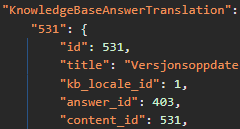
So perhaps… navigate a bit here and there, maybe you see some correlations to categories/lists to use 🙂
The init call contains the category translations
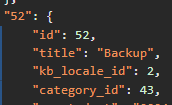
I might do something similar one day too… Luckily it is postponed for now!
Edit:
Or even worse… scrape… selenium perhaps. 💀
_Zammad: Feel free to hide my reply with a warning text if necessary._
---
### Author:  [@joB](https://community.zammad.org/u/joB)
#### Post date: [December 28, 2024, 4:36pm UTC](https://community.zammad.org/t/list-all-zammad-api-endpoints/16329/3 "2024-12-28T16:36:42Z")
Thank you for taking the time to answer and post these great tips and examples. I saw a similar tip in another post but didn’t quite understand it. With your examples, I now understand where to look in the browser’s network output.
I’ve now got my source KB export working, including most of the category titles. As expected, I need to access object {KnowledgeBaseCategoryTranslation} with the translation\_id of the category\_id. I get that object with the API endpoint: `/api/v1/knowledge_bases/[KB_ID]/answers/[ANSWER_ID]`
My missing translated category titles are a result of my script’s logic: if a category doesn’t have a direct answer but a subcategory, the answer\_ids array is empty and therefore skips my logic to get the translation in the answer. Since this isn’t a big problem in my specific case for five categories, I manually add the translated category titles to my export file.
If you ever need to do something similar, drop me a line and I can give you more insights into my script. That should save you time.
See below an overview of the needed API endpoint calls.
```auto
1. /api/v1/knowledge_bases/[KB_ID]
to get
- category_ids[]
- answer_ids[]
2. Loop /categories/ with category_ids[] i.e. 479
/api/v1/knowledge_bases/[KB_ID]/categories/[CATEGORY_ID]
to get
{
"id": 479,
"parent_id": 476,
"translation_ids": [
321
],
"answer_ids": [
2706,
...
],
"child_ids": [
479
],
- translation_ids[]
- answer_ids[]
3. Loop /answers/ with answer_ids[] i.e. 2706
/api/v1/knowledge_bases/[KB_ID]/answers/[ANSWER_ID]
to get
- {
"id": 2706,
"assets": {
"KnowledgeBaseAnswer": {
"2706": {
"id": 2706,
"category_id": 479,
"position": 3,
...
"translation_ids": [
2705 // Use to get translated answer content, see 4.
],
"attachments": [],
"tags": []
}
},
- "KnowledgeBaseCategory"[
"translation_ids": [
321
],
]
- "KnowledgeBaseCategoryTranslation": {
"321": {
"id": 321,
"title": "CURRENT-CATEGORY-TITLE", // Category 479
...
}
"318": {
"id": 318, // Category 476 (parent_id of category 479)
"title": "PARENT-CATEGORY-TITLE",
...
}
"317": {
"id": 317, // Category 475 (parent_id of category 476)
"title": "PARENT-CATEGORY-TITLE",)
...
}
]
4. Get translated answer body content
/api/v1/knowledge_bases/[KB_ID]/answers/2706?include_contents=2705
- in
"KnowledgeBaseAnswerTranslationContent": {
"2705": {
"id": 2705,
"body": "translated body of answer 2706 with translation_id 2705
",
"attachments": []
}
}
```
Finally, an answer to my original question about all possible API endpoints. This command can give some hints (as mentioned in another article):
```auto
zammad run rails routes
```
---
### Author:  [@Robz](https://community.zammad.org/u/Robz)
#### Post date: [December 31, 2024, 8:55am UTC](https://community.zammad.org/t/list-all-zammad-api-endpoints/16329/4 "2024-12-31T08:55:17Z")
Highly appreciated, thanks for sharing and a big thanks for making it so descriptive! This info will come in handy for later projects, when/if i find the time for it 😃
Didn’t know that rail command existed actually, but in the end it is often easier to just check network tab and go to a related part of the website app and see the routes there, that has helped me a lot, the same applies for most websites nowadays 🙂
---
### Author:  [@system](https://community.zammad.org/u/system)
#### Post date: [January 7, 2025, 8:56am UTC](https://community.zammad.org/t/list-all-zammad-api-endpoints/16329/5 "2025-01-07T08:56:02Z")
This topic was automatically closed 7 days after the last reply. New replies are no longer allowed.