# How to send notification by email to customer
**URL:** https://community.zammad.org/t/how-to-send-notification-by-email-to-customer/832
**Category:** Technical assistance
**Created:** [June 14, 2018, 5:33pm UTC](https://community.zammad.org/t/how-to-send-notification-by-email-to-customer/832 "2018-06-14T17:33:08Z")
**Posts on this page:** 9
**Page:** 1
### Author:  [@sestegra](https://community.zammad.org/u/sestegra)
#### Post date: [June 14, 2018, 5:33pm UTC](https://community.zammad.org/t/how-to-send-notification-by-email-to-customer/832/1 "2018-06-14T17:33:08Z")
- Used Zammad version: 2.4.1
- Used Zammad installation source: docker
- Operating system: Linux Ubuntu 16.04
- Browser + version: Chrome 67.0.3396.87
### Expected behavior:
- Email with a URL link need to sent to customer at every update
### Actual behavior:
- No email sent
### Steps to reproduce the behavior:
- Create a ticket as customer
- Agent received a notification
- Answer the ticket as agent
- As a result no email is sent to customer
---
### Author:  [@chesty](https://community.zammad.org/u/chesty)
#### Post date: [June 15, 2018, 2:10am UTC](https://community.zammad.org/t/how-to-send-notification-by-email-to-customer/832/2 "2018-06-15T02:10:37Z")
> Answer the ticket as agent
How do they answer? from their email client or from zammad web page?
If it’s from their email client I think you have to set up a trigger.
have a look at the existing triggers, look at
auto reply (on follow up of tickets), and look at Conditions for effected objects \*
you’ll need to make a new trigger similar to that one but instead of the Condition being Sender is Customer, the condition should be Sender is Agent.
I’m not sure if there’s anything else that needs changing or adjusting, but no doubt you can figure it all out, if not follow up here.
---
### Author:  [@ReisKanzlerTao](https://community.zammad.org/u/ReisKanzlerTao)
#### Post date: [June 15, 2018, 6:31am UTC](https://community.zammad.org/t/how-to-send-notification-by-email-to-customer/832/3 "2018-06-15T06:31:17Z")
@sestegra
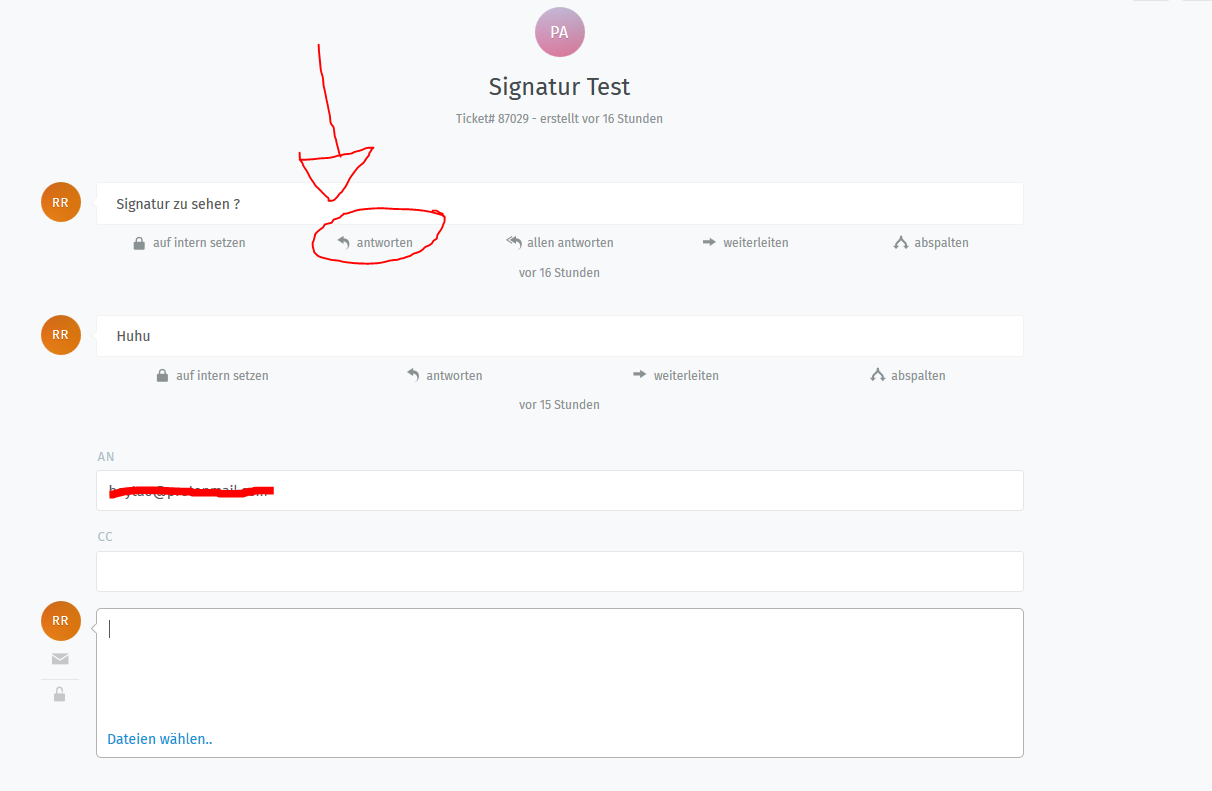
Did you used the “antworten=answer” button ?
It wont send an email to the customer over email if you dont use this button.
---
### Author:  [@sestegra](https://community.zammad.org/u/sestegra)
#### Post date: [June 15, 2018, 2:32pm UTC](https://community.zammad.org/t/how-to-send-notification-by-email-to-customer/832/4 "2018-06-15T14:32:48Z")
The button “Answer” is not present.
I’ve only “Set to internal” “Split” and “Delete” buttons.
---
### Author:  [@sestegra](https://community.zammad.org/u/sestegra)
#### Post date: [June 15, 2018, 3:44pm UTC](https://community.zammad.org/t/how-to-send-notification-by-email-to-customer/832/5 "2018-06-15T15:44:11Z")
@chesty Agent is answering by using the web application.
---
### Author:  [@MrGeneration](https://community.zammad.org/u/MrGeneration)
#### Post date: [June 18, 2018, 8:07pm UTC](https://community.zammad.org/t/how-to-send-notification-by-email-to-customer/832/6 "2018-06-18T20:07:16Z")
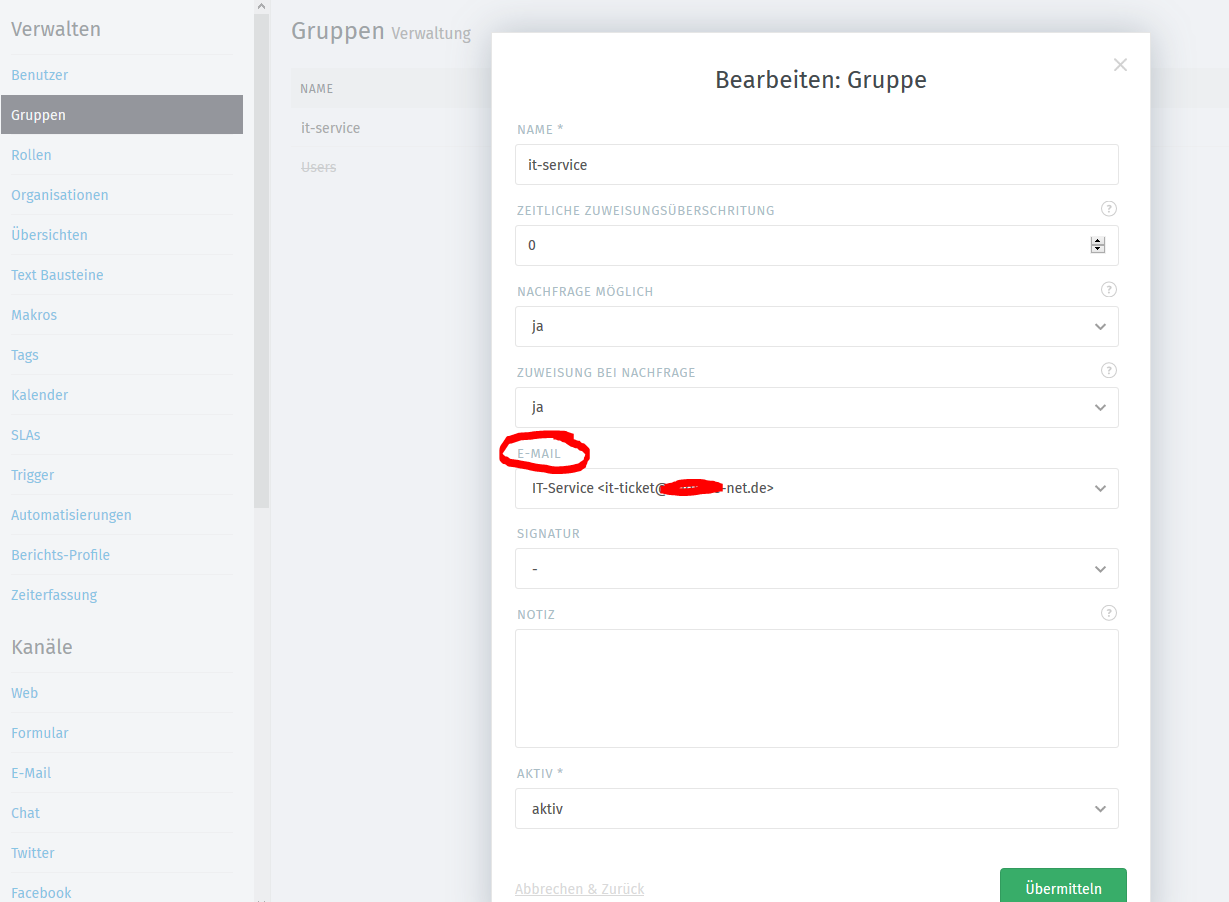
@sestegra this usually means, that the group you have the ticket in does not have an E-Mail-address assigned to. If you shortly moved the ticket into a group that does have a E-Mail-address and “Reply” will not appear, please reload the page - it sometimes doesn’t show up.
---
### Author:  [@ReisKanzlerTao](https://community.zammad.org/u/ReisKanzlerTao)
#### Post date: [June 20, 2018, 6:15am UTC](https://community.zammad.org/t/how-to-send-notification-by-email-to-customer/832/7 "2018-06-20T06:15:32Z")
@sestegra
Did you configure everything correctly?
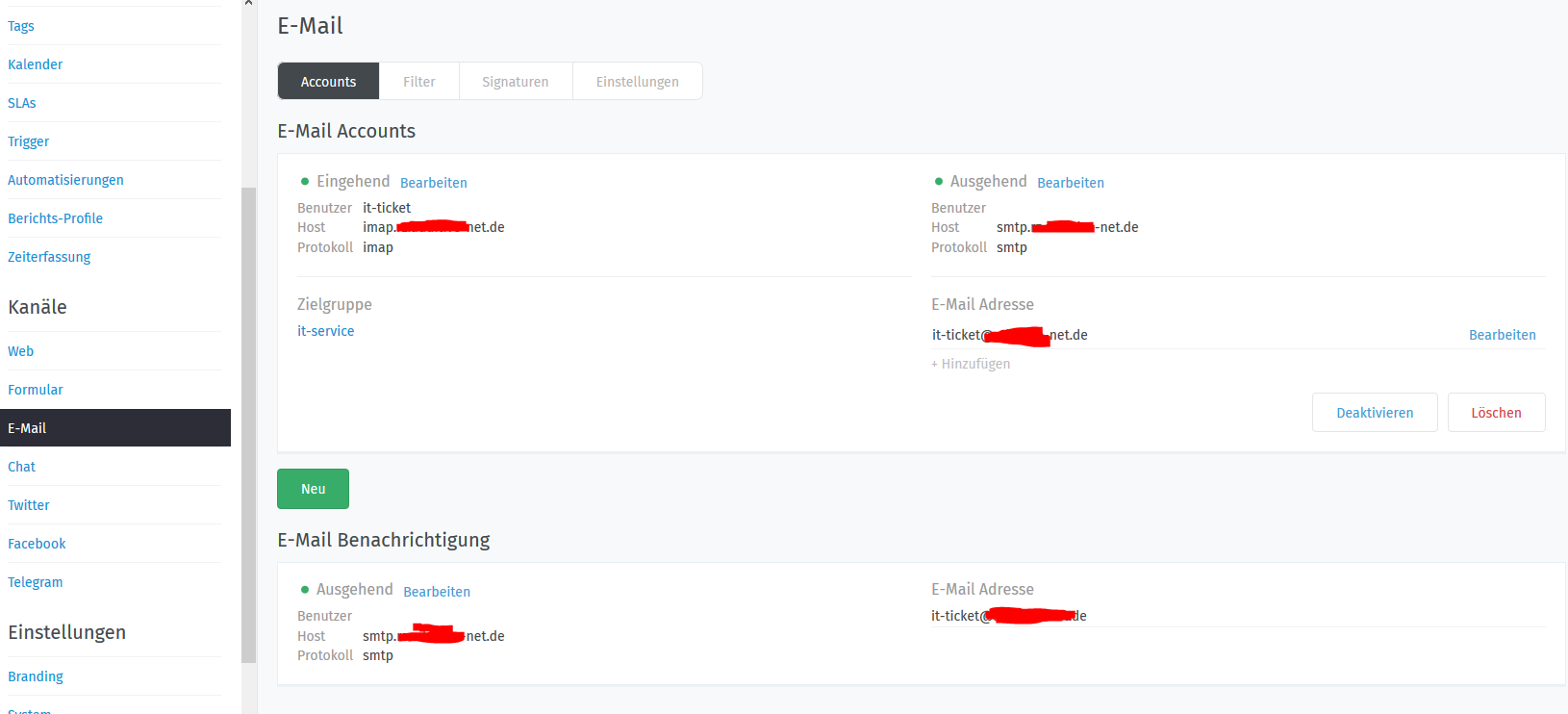
You also have to sign an email adress to your group like in the example under this text.
---
### Author:  [@sestegra](https://community.zammad.org/u/sestegra)
#### Post date: [June 20, 2018, 4:51pm UTC](https://community.zammad.org/t/how-to-send-notification-by-email-to-customer/832/8 "2018-06-20T16:51:29Z")
I’ve fixed my issue.
Basically, we need to add an email account per group.
Thank you for your support 😉
---
### Author:  [@system](https://community.zammad.org/u/system)
#### Post date: [October 18, 2018, 4:51pm UTC](https://community.zammad.org/t/how-to-send-notification-by-email-to-customer/832/9 "2018-10-18T16:51:31Z")
This topic was automatically closed 120 days after the last reply. New replies are no longer allowed.