# Help: \[solved \]Opps.. I'm sorry, but you have insufficient rights to open this Ticket. note with all tickets
**URL:** https://community.zammad.org/t/help-solved-opps-im-sorry-but-you-have-insufficient-rights-to-open-this-ticket-note-with-all-tickets/2429
**Category:** Technical assistance
**Created:** [April 25, 2019, 3:06pm UTC](https://community.zammad.org/t/help-solved-opps-im-sorry-but-you-have-insufficient-rights-to-open-this-ticket-note-with-all-tickets/2429 "2019-04-25T15:06:22Z")
**Posts on this page:** 8
**Page:** 1
### Author:  [@skepto](https://community.zammad.org/u/skepto)
#### Post date: [April 25, 2019, 3:06pm UTC](https://community.zammad.org/t/help-solved-opps-im-sorry-but-you-have-insufficient-rights-to-open-this-ticket-note-with-all-tickets/2429/1 "2019-04-25T15:06:22Z")
### Infos:
- Used Zammad version: 2.9
- Used Zammad installation source: (source, package, …)
- Operating system: Linux
- Browser + version: Chrome latest, Safari latest
### Expected behavior:
- be able to open and change tickets
### Actual behavior:
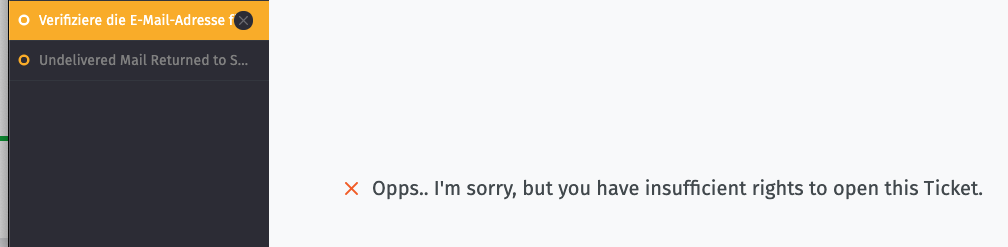
- " Opps… I’m sorry, but you have insufficient rights to open this Ticket." note with all tickets, even the ones I am owner off
### What did I do?
I am the admin of our Zammad instance which has just been installed and put into operation. Great job building Zammad btw!!!
Now I have added more e-mails and introduced a new nomenclature for roles, groups and overviews and renamed everything accordingly. (e.g. before: Bundesvorstand, now: BV.Vorstand)
Now I suddenly can’t open any more tickets. I have removed all the hooks in the agent settings and set them again. I should have full access to all tickets. But no change. The other agents can still use Zammad normally.
Is this bug known? What can I do to search for errors?
Many thanks in advance!
---
### Author:  [@dvnkln](https://community.zammad.org/u/dvnkln)
#### Post date: [April 26, 2019, 5:55am UTC](https://community.zammad.org/t/help-solved-opps-im-sorry-but-you-have-insufficient-rights-to-open-this-ticket-note-with-all-tickets/2429/2 "2019-04-26T05:55:49Z")
Hey @skepto,
which roles does your user have?
Go to _Admin_ → _Users_ → find your user and click on it
Which agent permissions are set in these roles?
Go to _Admin_ → _Roles_ → click on the assigned roles
Here’s a small explanation for those permission i’ve written in another topic:
> [@Ticket Permissions Question](https://community.zammad.org/t/ticket-permissions-question/2361/2):
>
> Hey @Premyslaw, if i got you right you’d need READ and CHANGE. This permits the role to - well - read a ticket (if you search for it) and edit an existing ticket. That way you can’t create a ticket for said group, nor see those tickets in an overview or act as an agent for that group. To break all rights down for you: READ - Have a look at existing tickets. CREATE - Create tickets. CHANGE - Edit existing tickets. OVERVIEW - See tickets in an overview. FULL - Full access. Makes you selec…
cheers
---
### Author:  [@skepto](https://community.zammad.org/u/skepto)
#### Post date: [April 26, 2019, 7:49am UTC](https://community.zammad.org/t/help-solved-opps-im-sorry-but-you-have-insufficient-rights-to-open-this-ticket-note-with-all-tickets/2429/3 "2019-04-26T07:49:37Z")
Hey @dvnkln,
my user has the role admin, agent and bv.vorstand
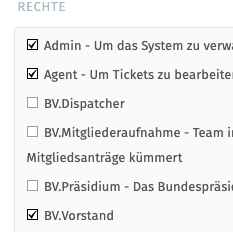
This are the agent permissions of BV.Vorstand
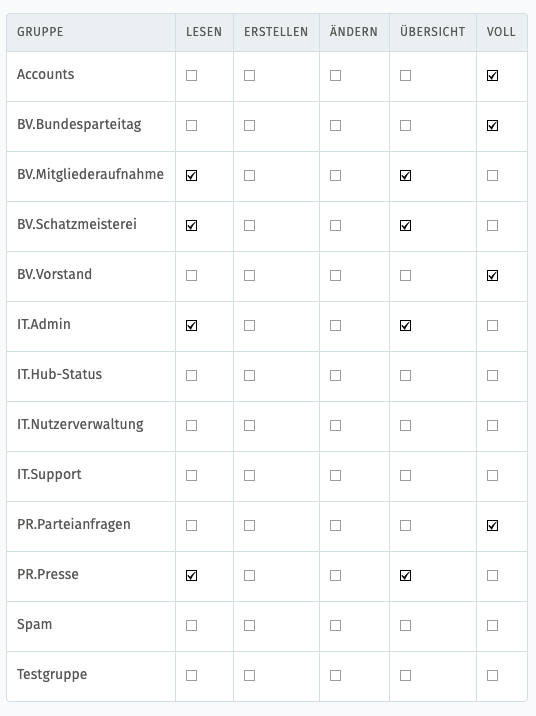
But no matter what agent permissions i give to my users. I cannot read any tickets.
---
### Author:  [@MrGeneration](https://community.zammad.org/u/MrGeneration)
#### Post date: [April 26, 2019, 8:31am UTC](https://community.zammad.org/t/help-solved-opps-im-sorry-but-you-have-insufficient-rights-to-open-this-ticket-note-with-all-tickets/2429/4 "2019-04-26T08:31:52Z")
Just to understand completely: If you have a role with right to all groups (or all roles together with the rights to all groups in overall) then you are not able to access the tickets?
Please take a look into your logfile and take a look if something appears there.
In the URL you’ll find an ID, do `zammad run rails r 'p Ticket.find({ID})'` and check in which group it lifes ( `zammad run rails r ' p Group.find(GROUP-ID)'`. Check if you have rights to that group.
Also, your template is incomplete.
---
### Author:  [@skepto](https://community.zammad.org/u/skepto)
#### Post date: [April 26, 2019, 8:46am UTC](https://community.zammad.org/t/help-solved-opps-im-sorry-but-you-have-insufficient-rights-to-open-this-ticket-note-with-all-tickets/2429/5 "2019-04-26T08:46:37Z")
> [@MrGeneration](#):
>
> If you have a role with right to all groups (or all roles together with the rights to all groups in overall) then you are not able to access the tickets?
Yes, exactly that!
Do I find the logfile in the GUI, or on the server? I’m just Zammad-Admin, no Serveradmin. Have to go to our Systemadministrator if the latter is the case.
---
### Author:  [@dvnkln](https://community.zammad.org/u/dvnkln)
#### Post date: [April 26, 2019, 8:49am UTC](https://community.zammad.org/t/help-solved-opps-im-sorry-but-you-have-insufficient-rights-to-open-this-ticket-note-with-all-tickets/2429/6 "2019-04-26T08:49:26Z")
It’s on the server inside the root folder of your zammad installation.
There should be a folder\* called `log`.
\*_a link to a folder depending on your os_
---
### Author:  [@skepto](https://community.zammad.org/u/skepto)
#### Post date: [May 3, 2019, 9:26am UTC](https://community.zammad.org/t/help-solved-opps-im-sorry-but-you-have-insufficient-rights-to-open-this-ticket-note-with-all-tickets/2429/7 "2019-05-03T09:26:47Z")
I was able to find the problem and fix it.
The checkbox “agent - access to CTI” was not set at the role “Admin”.
Thanks for your help!
---
### Author:  [@system](https://community.zammad.org/u/system)
#### Post date: [August 31, 2019, 9:26am UTC](https://community.zammad.org/t/help-solved-opps-im-sorry-but-you-have-insufficient-rights-to-open-this-ticket-note-with-all-tickets/2429/8 "2019-08-31T09:26:55Z")
This topic was automatically closed 120 days after the last reply. New replies are no longer allowed.