# Custom Object visibility based on user role / group
**URL:** https://community.zammad.org/t/custom-object-visibility-based-on-user-role-group/4950
**Category:** Completed Features
**Tags:** zammad-50, done
**Created:** [July 16, 2020, 3:08pm UTC](https://community.zammad.org/t/custom-object-visibility-based-on-user-role-group/4950 "2020-07-16T15:08:26Z")
**Posts on this page:** 4
**Page:** 1
### Author:  [@sseider](https://community.zammad.org/u/sseider)
#### Post date: [July 16, 2020, 3:08pm UTC](https://community.zammad.org/t/custom-object-visibility-based-on-user-role-group/4950/1 "2020-07-16T15:08:26Z")
I wanted to know if it will be possible in future to make custom objects only visible to a specific user role or group.
The idea behind is - if a ticket is moved from one to another group, let’s say from “support” to “sales” - the needed custom objects may differ from group “support” to group “sales”.
In order not to worsen the good usability of zammad, useless custom objects should not be displayed if they’re don’t needed.
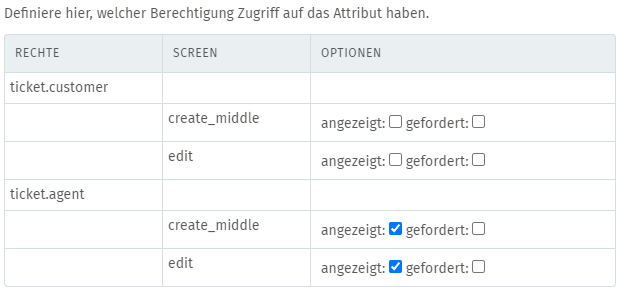
Currently the visibility can only be choosen between the following “roles”:
---
### Author:  [@MrGeneration](https://community.zammad.org/u/MrGeneration)
#### Post date: [July 20, 2020, 9:59am UTC](https://community.zammad.org/t/custom-object-visibility-based-on-user-role-group/4950/2 "2020-07-20T09:59:59Z")
It technically would be possible, however, I’m sorry.
We don’t provide ETAs or information on “if this could be implemented”.
As this is an feature request, this is up to the communtiy to vote on your first post on here to be “noticed”.
---
### Author:  [@system](https://community.zammad.org/u/system)
#### Post date: [September 6, 2021, 7:08am UTC](https://community.zammad.org/t/custom-object-visibility-based-on-user-role-group/4950/3 "2021-09-06T07:08:26Z")
This topic was automatically closed after 416 days. New replies are no longer allowed.
---
### Author:  [@brigitte](https://community.zammad.org/u/brigitte)
#### Post date: [August 27, 2026, 10:29pm UTC](https://community.zammad.org/t/custom-object-visibility-based-on-user-role-group/4950/4 "2026-08-27T22:29:27Z")
Good news for anyone who is still waiting on this: this is what **Core Workflows** (introduced in Zammad 5.0) were built for, and they turn it inside out: instead of asking _“which fields exist for everyone”_, you now define _“who sees which fields, when”_ — per role, per group, per object and per lifecycle state.
Here is what Core Workflows can do today:
1. **Show / hide fields per group and per role** — the exact use case of this thread. E.g. \*"when the ticket’s group is **Sales** , hide the _Support Reason_ field; when it is **2nd Level** , show only _Category_, _Operating System_, _Software used"_. That is one of the official examples in the docs (_Group Based Fields_).
2. **Enforce `mandatory` per context** — a field can be optional in “Sales” and mandatory in “2nd Level” without a duplicate object.
3. **Limit or fix the selectable values per context** (e.g. `Category set fixed to 2nd Level`) — so the user cannot go off-rails.
4. **Reactive conditions** (“Saved conditions”): the workflow reacts to state _after_ it is saved — what you need when a field must change _after_ group / state / owner changed on an existing ticket, not just at creation.
5. **Multiple objects and contexts per workflow** — the same workflow can span _ticket_, _ticket customer_, _user_, _organization_ and custom objects; you can chain **multiple workflows** with priorities so the more specific rule wins.
6. **Role awareness** — conditions on _Role_ (e.g. `Role is not Approval Person`) let you lock a ticket for everyone except a specific approval group (official docs example _Approval Person_).
7. **Field actions on related objects** — e.g. a workflow on the **user** object can still show / hide fields for the ticket customer context.
8. **Versioned & auditable** — each workflow is a first-class object: clone it, version control it, reuse it across instances.
9. **Beyond this use case** — the same mechanism covers mandatory-on-close, handover notes, approval flows, per-group field restriction, … in a single, central place.
Docs:
- Overview: [https://admin-docs.zammad.org/en/latest/system/core-workflows.html](https://admin-docs.zammad.org/en/latest/system/core-workflows.html)
- How they work (objects, contexts, actions): [How do they work? — Zammad Admin Documentation documentation](https://admin-docs.zammad.org/en/latest/system/core-workflows/how-do-they-work.html)
- Learn by Example (ready-to-replicate setups): [https://admin-docs.zammad.org/en/latest/system/core-workflows/learn-by-example.html](https://admin-docs.zammad.org/en/latest/system/core-workflows/learn-by-example.html)
- Limitations (what is not covered yet): [Limitations — Zammad Admin Documentation documentation](https://admin-docs.zammad.org/en/latest/system/core-workflows/limitations.html)
So this request is implemented — and then some. If your exact use case differs (e.g. cross-object visibility beyond ticket / customer / agent), flag it in the thread; happy to help translate it into a workflow config.