# Azure AI API Integration Error – "Invalid request"
**URL:** https://community.zammad.org/t/azure-ai-api-integration-error-invalid-request/19924
**Category:** Technical assistance
**Created:** [March 30, 2026, 1:01pm UTC](https://community.zammad.org/t/azure-ai-api-integration-error-invalid-request/19924 "2026-03-30T13:01:25Z")
**Posts on this page:** 13
**Page:** 1
### Author:  [@awild](https://community.zammad.org/u/awild)
#### Post date: [March 30, 2026, 1:01pm UTC](https://community.zammad.org/t/azure-ai-api-integration-error-invalid-request/19924/1 "2026-03-30T13:01:25Z")
### Infos:
- Used Zammad version: 7.0.0-1773148656.3c95b7da.centos9
- Used Zammad installation type: package
- Operating system: centos9
- Browser + version: MS Edge & Google Chrome
### Expected behavior:
The Azure AI provider should be successfully connected to Zammad after entering valid API credentials (token + URL),
allowing AI-powered features (e.g., chat completions) to function.
### Actual behavior:
When saving the Azure AI configuration under Settings → AI → Provider, the following error appears:
“AI provider is not accessible: Invalid request – please check your input”
The configuration is not saved, and no further details are provided in the UI or logs (if checked).
### Steps to reproduce the behavior:
Navigate to Settings → AI → Provider.
Select Azure AI from the dropdown.
Token: [Valid Azure AI API key, confirmed working via direct API calls]
URL (Completions): https://[region].openai.azure.com/openai/deployments/[deployment-name]/chat/completions?api-version=2023-05-15 (format matches Azure’s documentation).
URL (Completions): [https://xxxxxxx-swedencentral.openai.azure.com/openai/deployments/GPT5-Zammad-Test/chat/completions?api-version=2025-03-01-preview](https://xxxxxxx-swedencentral.openai.azure.com/openai/deployments/GPT5-Zammad-Test/chat/completions?api-version=2025-03-01-preview)
Leave OCR disabled (not required).
Click Save.
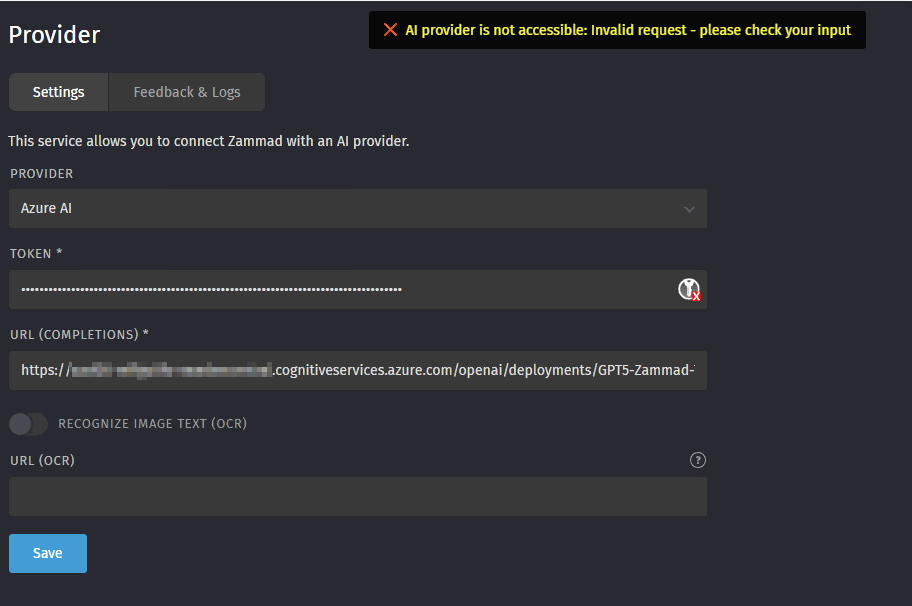
Error: AI provider is not accessible: Invalid request – please check your input.
---
### Author:  [@dominikklein](https://community.zammad.org/u/dominikklein)
#### Post date: [March 30, 2026, 1:30pm UTC](https://community.zammad.org/t/azure-ai-api-integration-error-invalid-request/19924/2 "2026-03-30T13:30:52Z")
Did you check the HttpLog (Feedback & Logs tab) for additional information?
The URL does not look that bad, but maybe it’s something else. Compared to our testing, it’s a “thinking” LLM, which is used; maybe this is causing problems.
I can also try to create a later or tomorrow, some GPT-5 url, and check if it’s working.
---
### Author:  [@awild](https://community.zammad.org/u/awild)
#### Post date: [March 30, 2026, 1:50pm UTC](https://community.zammad.org/t/azure-ai-api-integration-error-invalid-request/19924/3 "2026-03-30T13:50:43Z")

Mistral, for example, works perfectly.
Azure AI causes problems.
---
### Author:  [@dominikklein](https://community.zammad.org/u/dominikklein)
#### Post date: [March 30, 2026, 2:07pm UTC](https://community.zammad.org/t/azure-ai-api-integration-error-invalid-request/19924/4 "2026-03-30T14:07:59Z")
I mean not AI-Error-Log. It was about the HttpLog (“Recent Logs”) which should be directly visible on this tab.
---
### Author:  [@awild](https://community.zammad.org/u/awild)
#### Post date: [March 30, 2026, 2:30pm UTC](https://community.zammad.org/t/azure-ai-api-integration-error-invalid-request/19924/5 "2026-03-30T14:30:43Z")
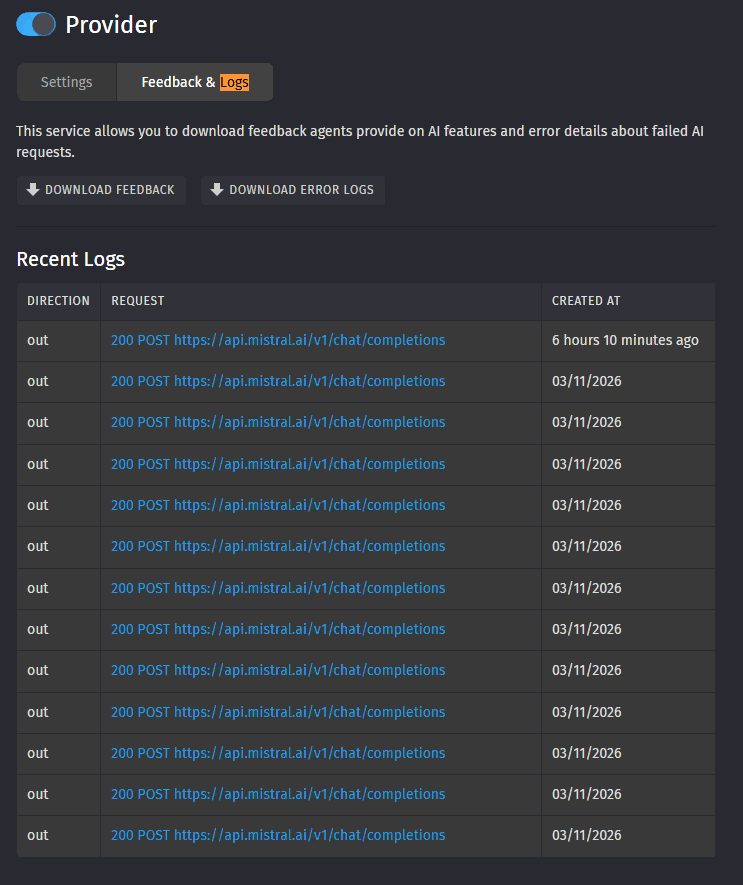
No log entrys visible for azure:
---
### Author:  [@dominikklein](https://community.zammad.org/u/dominikklein)
#### Post date: [March 30, 2026, 8:53pm UTC](https://community.zammad.org/t/azure-ai-api-integration-error-invalid-request/19924/6 "2026-03-30T20:53:15Z")
Ok, normally errors on provider configuration should also be logged. Maybe we missed something here 🙂
---
### Author:  [@awild](https://community.zammad.org/u/awild)
#### Post date: [March 31, 2026, 11:48am UTC](https://community.zammad.org/t/azure-ai-api-integration-error-invalid-request/19924/7 "2026-03-31T11:48:19Z")
OK, I am waiting for your feedback on how we can proceed. Thank you
---
### Author:  [@fliebe92](https://community.zammad.org/u/fliebe92)
#### Post date: [March 31, 2026, 12:30pm UTC](https://community.zammad.org/t/azure-ai-api-integration-error-invalid-request/19924/8 "2026-03-31T12:30:27Z")
Hi @awild. Do you have any logs in general available from your Zammad instance? `production.log` for example.
---
### Author:  [@awild](https://community.zammad.org/u/awild)
#### Post date: [March 31, 2026, 12:57pm UTC](https://community.zammad.org/t/azure-ai-api-integration-error-invalid-request/19924/9 "2026-03-31T12:57:22Z")
This error is contained in the log file:
I, [2026-03-31T14:51:51.900423#1032335-84192] INFO – : Parameters: {“name” =\> “ai\_provider\_config”, “state\_current” =\> {“value” =\> {“provider” =\> “azure”, “token” =\> “[FILTERED]”, “url\_completions” =\> “[https://xxxxxx-swedencentral.cognitiveservices.azure.com/openai/deployments/GPT5-Zammad-Test/chat/completions?api-version=2025-01-01-preview](https://xxxxxx-swedencentral.cognitiveservices.azure.com/openai/deployments/GPT5-Zammad-Test/chat/completions?api-version=2025-01-01-preview)”, “url\_ocr” =\> “”, “ocr\_active” =\> false}}, “id” =\> “284”}
E, [2026-03-31T14:51:52.482667#1032335-84192] ERROR – : Validation failed: AI provider is not accessible: Invalid request - please check your input (ActiveRecord::RecordInvalid)
---
### Author:  [@dominikklein](https://community.zammad.org/u/dominikklein)
#### Post date: [March 31, 2026, 8:55pm UTC](https://community.zammad.org/t/azure-ai-api-integration-error-invalid-request/19924/10 "2026-03-31T20:55:27Z")
We checked the Azure provider implementation and know the root cause.
I will create a bug report tomorrow.
---
### Author:  [@dominikklein](https://community.zammad.org/u/dominikklein)
#### Post date: [April 1, 2026, 1:33pm UTC](https://community.zammad.org/t/azure-ai-api-integration-error-invalid-request/19924/11 "2026-04-01T13:33:54Z")
>
>
> \### Used Zammad Version
>
> 7.0
>
> \### Environment
>
> \- Installation method: any
> \- Oper…ating system: any
> \- Database + version: any
> \- Elasticsearch version: any
> \- Browser + version: any
>
>
> \### Actual behaviour
>
> If one of \[the "reasoning" OpenAI models\](https://developers.openai.com/api/docs/guides/reasoning) is configured for an AI provider (i.e. \`model\_id.match?(/^(o\\d|gpt-5)/)\`), it can raise the following error during AI feature usage:
>
> \`\`\`json
> {
> "error": {
> "message": "Unsupported value: 'temperature' does not support 0.1 with this model. Only the default (1) value is supported.",
> "type": "invalid\_request\_error",
> "param": "temperature",
> "code": "unsupported\_value"
> }
> }
> \`\`\`
>
> \### Expected behaviour
>
> Zammad should not send an unsupported parameter value to the AI provider in case we can assume the model will reject the request.
>
> \### Steps to reproduce the behaviour
>
> 1. Configure a "Custom (OpenAI Compatible)" AI provider, that uses one of the "reasoning" models (\`gpt-5.4\` is a good choice).
> 2. Note that the configuration is saved (after a successful "ping" request).
> 3. Try to use an AI feature with a temperature (e.g. Ticket Summary).
> 4. Note the aforementioned error in the logs.
>
> Although a similar issue was already addressed for the "OpenAI" provider in #5759, with the new models available under other providers, we are facing a similar problem.
>
> There doesn't seem to be a "model capability" API we can use to determine if the model indeed supports a custom temperature. Consider implementing a simple "check" which is executed immediately after a successful "ping". In case it raises an error, remember that the temperature should not be used with this model.
>
> \### PoC
>
> \
> \Failed "check"\
>
> \`\`\`
> $ curl "https://openai-compatible-domain.tld/v1/chat/completions" \\
> -H 'Content-Type: application/json' \\
> -H "Authorization: Bearer $OPEN\_AI\_TOKEN" \\
> -X POST \\
> --data '{ "model": "gpt-5", "messages": \[{ "role": "user", "content": "whats your name?" }\], "stream": false, "store": false, "temperature": 0.5 }' \\
> -w "\\n%{http\_code}\\n"
> {
> "error": {
> "message": "Unsupported value: 'temperature' does not support 0.5 with this model. Only the default (1) value is supported.",
> "type": "invalid\_request\_error",
> "param": "temperature",
> "code": "unsupported\_value"
> }
> }
> 400
> \`\`\`
> \
>
> \
> \Successful "check"\
>
> \`\`\`
> $ curl "https://openai-compatible-domain.tld/v1/chat/completions" \\
> -H 'Content-Type: application/json' \\
> -H "Authorization: Bearer $OPEN\_AI\_TOKEN" \\
> -X POST \\
> --data '{ "model": "gpt-4", "messages": \[{ "role": "user", "content": "whats your name?" }\], "stream": false, "store": false, "temperature": 0.5 }' \\
> \-w "\\n%{http\_code}\\n"
> {
> "id": "chatcmpl-DPlAgtku2MGmzO2ltx4uBAs2hwRT3",
> "object": "chat.completion",
> "created": 1775031898,
> "model": "gpt-4-0613",
> ...
> }
> 200
> \`\`\`
> \
>
> \### Support Ticket
>
> Ticket#10219325, Ticket#10219962
>
> \### I'm sure this is a bug and no feature request or a general question.
>
> yes
---
### Author:  [@awild](https://community.zammad.org/u/awild)
#### Post date: [April 13, 2026, 8:28am UTC](https://community.zammad.org/t/azure-ai-api-integration-error-invalid-request/19924/12 "2026-04-13T08:28:34Z")
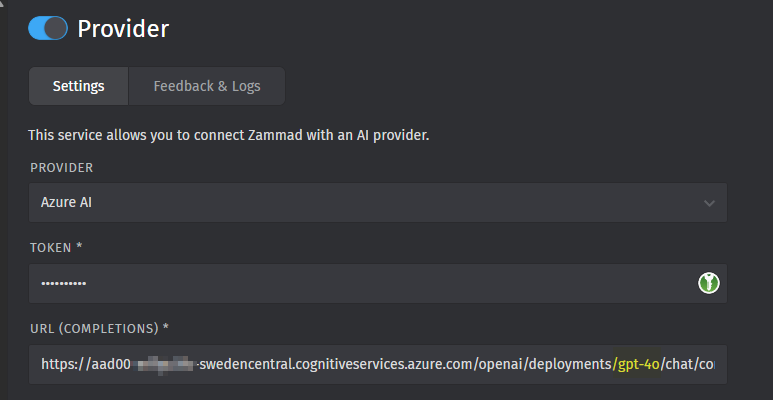
New info, it works with GPT-4o:
---
### Author:  [@dominikklein](https://community.zammad.org/u/dominikklein)
#### Post date: [April 14, 2026, 7:32am UTC](https://community.zammad.org/t/azure-ai-api-integration-error-invalid-request/19924/13 "2026-04-14T07:32:20Z")
Yes, we know, because it has no problems with the temperature 🙂 We have also the fix in the pipeline, should be available during the week, let’s see how it’s going.